Export Netcore Events Straight to Your SFTP Server
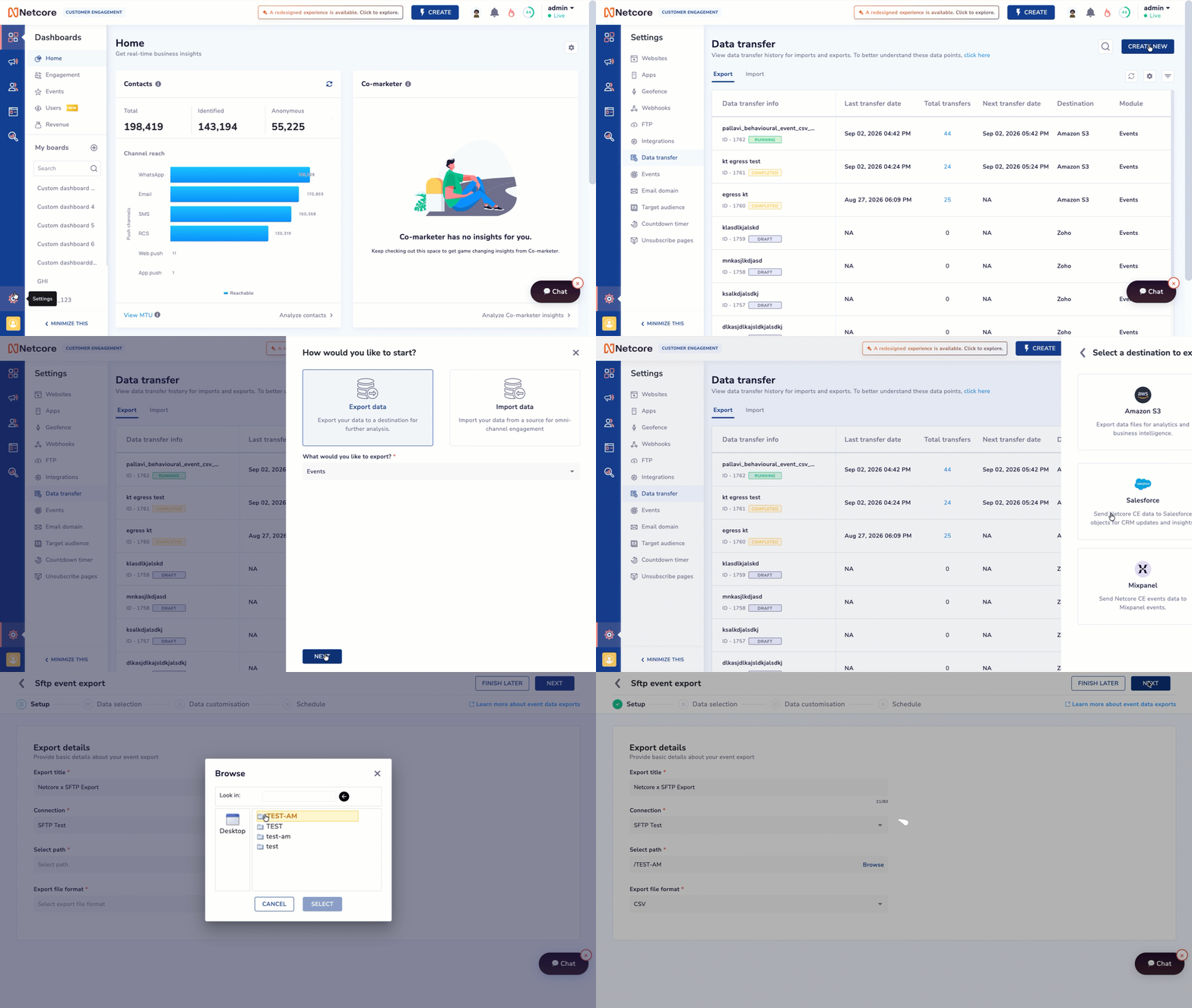
Schedule Netcore CE event data to export directly to your own SFTP server, in the file format your pipeline already reads.
What’s New
Added SFTP as an Egress Data Transfer destination. Pick a connection and target directory in a few clicks.
Added three export formats: CSV, JSON, and Parquet.
Added data transformations: mask fields, rename columns, convert field types, reformat dates.
Added Send Test Data to validate your setup with a sample file.
Added flexible scheduling: set start/end dates and frequency (Hourly, Daily, Weekly).
Why It Matters
Pick the format your systems already read: CSV, JSON, or Parquet.
Mask and reshape sensitive fields before data leaves Netcore.
Validate with sample data first, then let the schedule run on its own.
Prerequisites: a pre-configured SFTP connection under Settings > Integrations; supports standard and behavioural events with Standard or Consolidated schema.
Navigate to Settings > Data Transfer > CREATE NEW, select Export data > Events, and choose SFTP to start scheduling exports.
Read the documentation to know more.