Frequency capping
Release Date:
21st September 2023
Overview
In this release, we are excited to introduce the Generic Frequency Capping feature, a significant enhancement to our platform. This feature offers global configuration options for frequency capping across all communication channels, making it easier for users to manage message distribution and optimize customer engagement.
Key Highlights
Generic Frequency Capping
- Global Setting: The Generic Frequency Capping feature is now available as a global setting that can be easily enabled or disabled by the platform administrator. This ensures consistent frequency capping rules across all communication channels.
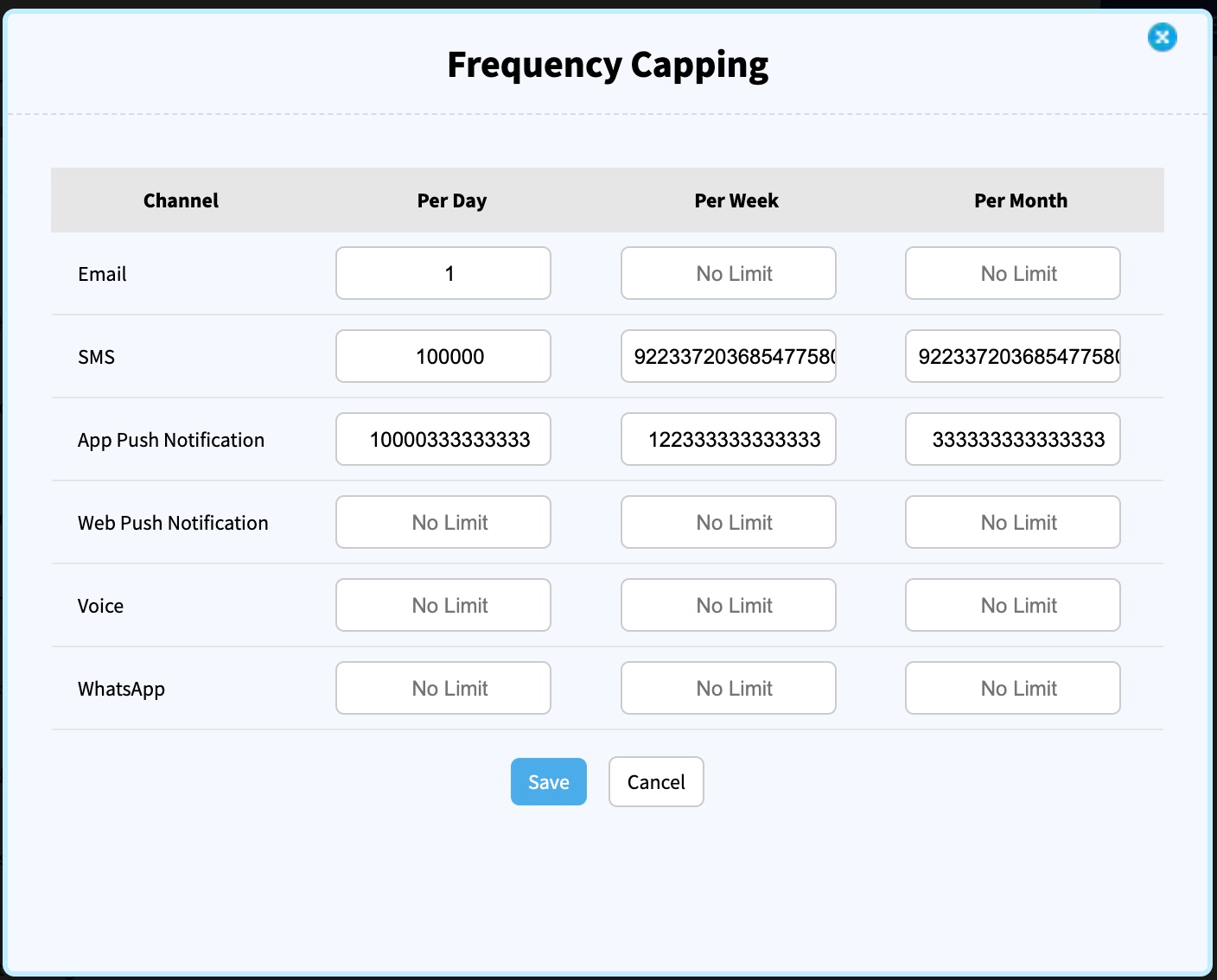
- Per-Day, Per-Week, Per-Month Limits: Users can now set limits on the number of messages sent per day, per week, and per month for each communication channel, including WhatsApp. This granular control allows for more precise management of message frequency.
Reporting Enhancements
- Not Sent Column: Reporting has been updated to include a "Not Sent" column, which provides insights into messages that were not sent due to frequency capping rules being applied. This column includes messages that were suppressed for various reasons, such as blocklisting, opt-outs, and frequency capping.
- Remark Column: The "Not Sent" column includes a "Remarks" section that provides specific reasons for message suppression, ensuring transparency in reporting. Reasons may include frequency capping, blocklisting, opt-outs, and more.
Future Enhancements
In upcoming releases, we plan to further enhance our reporting capabilities. This will include tracking messages that were not sent due to reasons such as "Dropped due to DND (Do Not Disturb)" and "Prepaid Limit reached." We are committed to providing comprehensive reporting to ensure our customers have full visibility into message delivery.
UI Changes
As part of this release, the Frequency Capping settings will now be displayed as a separate, easily accessible box, rather than being nested within advanced options. This change aims to improve feature discoverability and streamline the configuration process.
How to Use
To take advantage of the Generic Frequency Capping feature, follow these steps:
- Access Frequency Capping: Log in to your account as the platform administrator.
- Navigate to Settings: Go to the settings section, where you can find the Frequency Capping settings.
- Configure Settings: Enable or disable the Generic Frequency Capping feature and set limits for each communication channel according to your preferences.
- Save Changes: Ensure to save your configuration settings.
Conclusion
We believe that the Generic Frequency Capping feature will significantly improve the way you manage message distribution and enhance your customer engagement strategies. We are committed to continually enhancing our platform to provide you with the best possible experience.
If you have any questions or need assistance with this new feature, please don't hesitate to reach out to our support team ([email protected]). We appreciate your feedback as we work together to optimize your communication efforts.
Thank you for choosing Smartech as your trusted Martech solution.