What's New

Follow new updates and improvements to Netcore CE.

New Feature

Custom Unsubscribe : Give Your Customers a Better Way to Opt Out

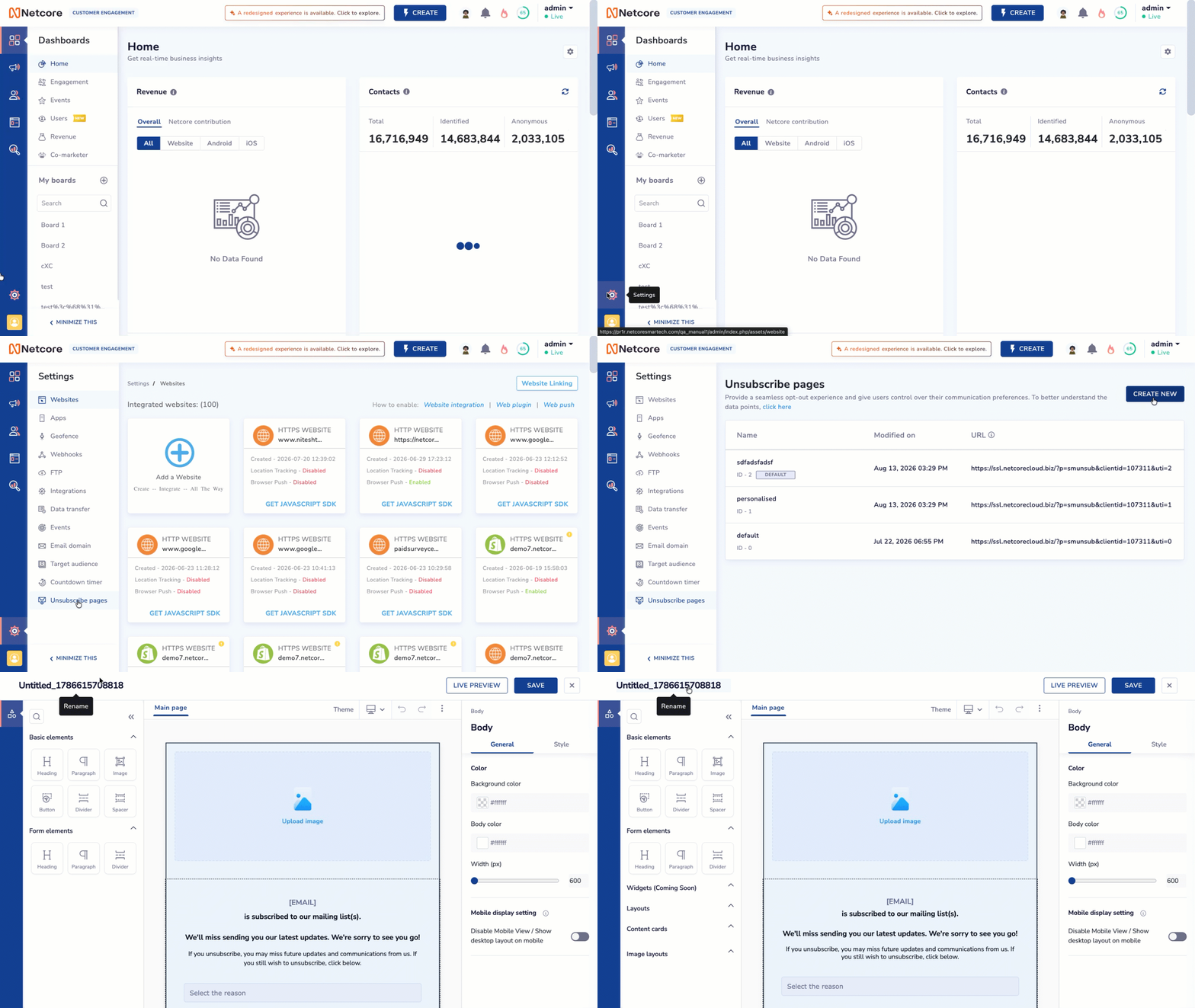
Until now, clicking the unsubscribe link in your email took users to the default Netcore unsubscribe experience.

Now, you can replace that default link with your own unsubscribe page. Build an experience that matches your brand, collect feedback on why users are leaving, or give them the option to manage their communication preferences instead.

What’s New

  • Added support for a custom unsubscribe link that replaces the default Netcore-generated unsubscribe link.

  • Let users land on your branded unsubscribe page instead of a standard unsubscribe experience.

  • Use your custom page to collect unsubscribe feedback and understand why users opt out.

  • Give users a preference center option so they can adjust their communication preferences instead of unsubscribing completely.

  • Manage the unsubscribe process and redirect users to your custom landing page after they click the link.


Why It Matters

  • Keep your brand experience consistent: Extend your brand identity to the unsubscribe journey.

  • Understand why users leave: Collect feedback when users choose to unsubscribe and use those insights to improve your email strategy.

  • Retain subscribers: Offer communication preferences for users who want fewer emails instead of opting out completely.

  • Stay in control: Manage the unsubscribe experience and landing page based on your business requirements.
Read the documentation to know more.

New Feature

Stop Losing Subscribers Over One Type of Email

Until now, email unsubscribe was mostly all or nothing. A user who wanted to stop receiving promotional emails had to unsubscribe from everything, including important updates.

Now, Subscription Management lets you give recipients control over what they want to receive. Create subscription categories, group related preferences, and give users a branded preference page where they can choose what stays in their inbox.

What’s New

  • Added subscription categories to let recipients opt in or out of specific types of email.

  • Added groups to organize related categories and keep the preference page easy to navigate.

  • Added a customizable preference page where you can add your logo, background color, font, headline, body text, categories, and groups.

  • Added a mandatory Unsubscribe from All option for recipients who want to stop all email communication.

  • Automatically pre-fill the preference page with each recipient’s existing choices.

  • Added preference data as user attributes, so you can build segments based on the categories users have selected.

  • Added support for secure, token-based access to the preference page without requiring users to log in.


Why It Matters

  • Give users more control: Let recipients choose which emails they want instead of forcing an all-or-nothing unsubscribe.

  • Reduce unnecessary unsubscribes: Users can opt out of promotions while continuing to receive important transactional or service updates.

  • Keep your brand consistent: Customize the preference page with your brand elements and messaging.

  • Turn preferences into targeting data: Use subscription choices to build target or suppression segments for future campaigns.

  • Make preference management simpler: Users can update their choices directly from the email without logging in.


Limits to know: You can create up to 25 active subscription categories and 10 groups. Preference changes sync to segments within up to 6-12 hours.

Prerequisites: Preference Page is currently available as a controlled release and must be enabled by Netcore’s SRE team. GA release will be available soon. To enable Preference Page, contact your Netcore Account Manager. Once enabled, create and configure your subscription categories and preference groups in Subscription Management. Use the generated Preference Page URL as the unsubscribe link in your email template. When users click the unsubscribe link, they will be redirected to the Preference Page to manage their subscription preferences.

Customers are responsible for using the user’s preference values to build the target audience for campaigns and ensuring that emails are sent only to users who have opted in to the relevant subscription category.

On the CE dashboard, navigate to Settings > Preference Page to configure your subscription categories, groups, and preference page.
Read the documentation to know more.

New Feature

Import Data from Snowflake to Netcore CE

Until now, bringing data from Snowflake into Netcore CE required additional data movement or integration workflows.


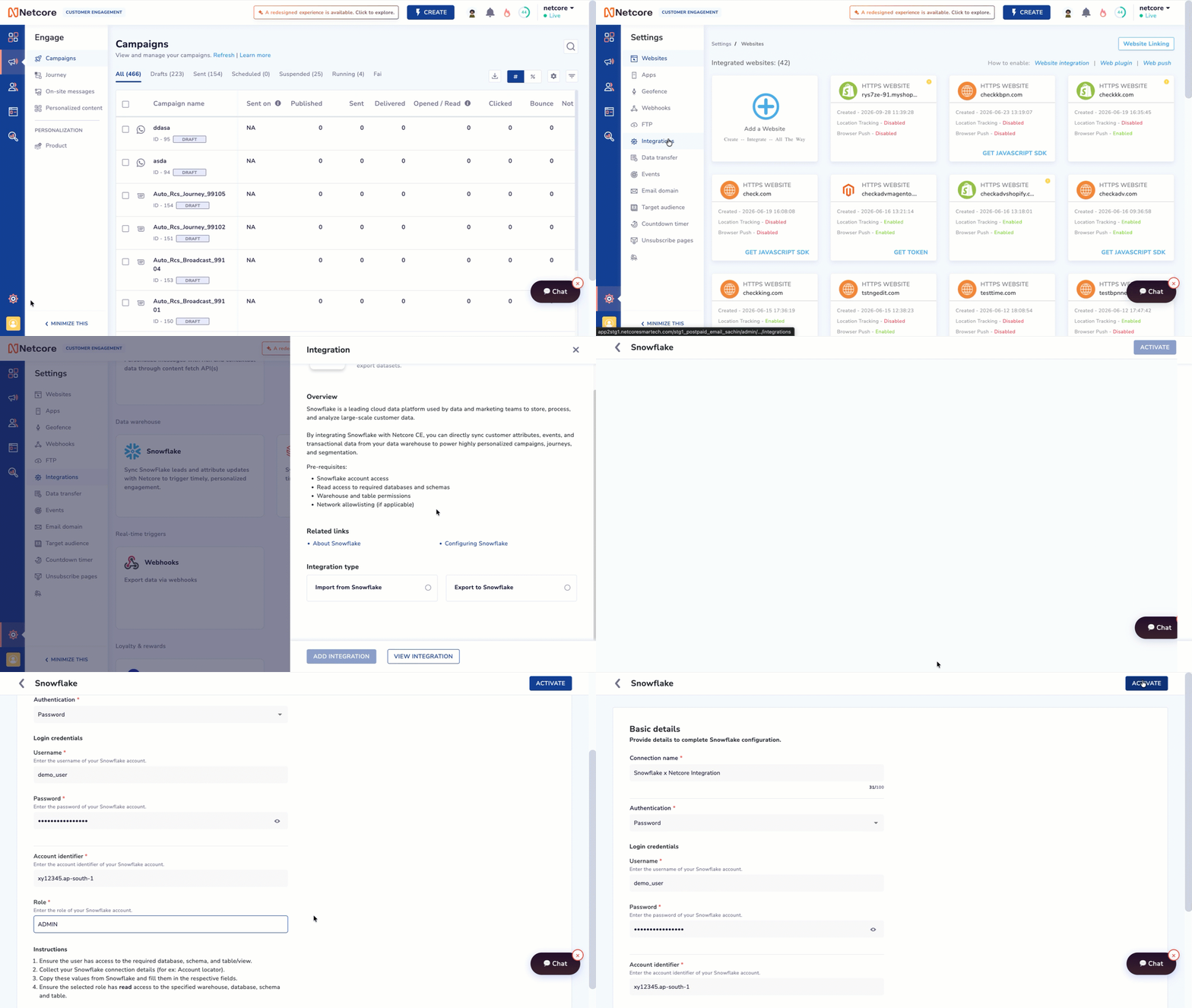
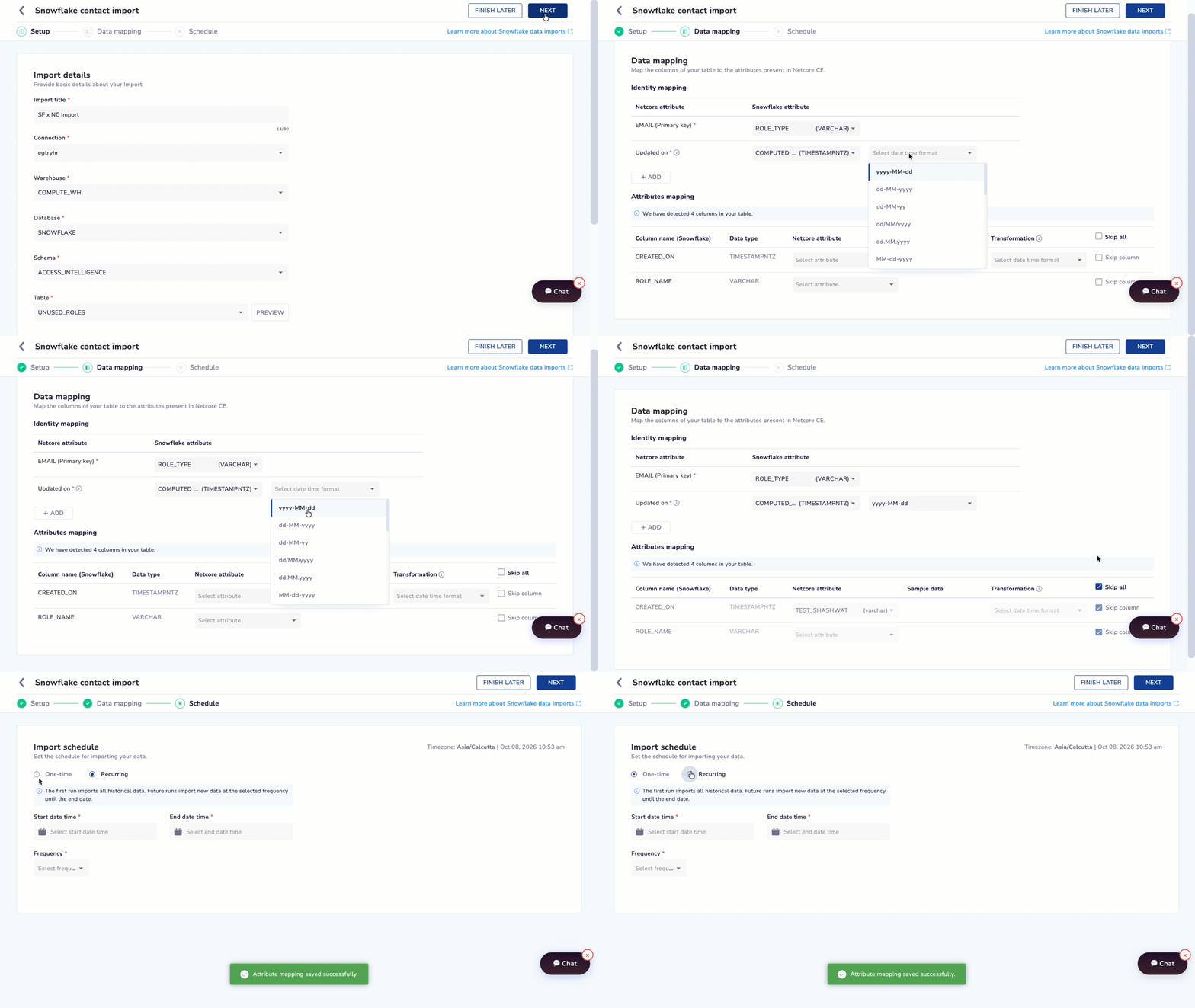
Now, you can connect Snowflake with Netcore CE and import data directly into your CE panel. This helps you use data stored in Snowflake for customer engagement and personalization.

What’s New

  • Added Snowflake as a data source for importing data into Netcore CE.

  • Connect your Snowflake account and configure the data import.

  • Import data from Snowflake into Netcore CE for use in customer engagement.

  • Manage the data transfer without manually exporting and uploading files.


Why It Matters

  • Bring data from your existing Snowflake warehouse directly into Netcore CE.

  • Reduce manual data movement between platforms.

  • Use centralized customer data to power more relevant engagement.

Navigation: Settings > Integration > Snowflake


Refer to the documentation to know more.

New Feature

New Open & Click Propensity Models (All Channels)

Unified Multi-Channel Predictive Segmentation

We are excited to announce a major upgrade to our predictive segmentation capabilities. To provide you with a more seamless and powerful experience, we have consolidated all predictive features into a single, unified tool: Propensities in Segments.
With this release, we are sunsetting the legacy "Predictive Segments (Raman)" tool and moving toward a "One Product, One Mental Model" approach. This transformation shifts our platform from fragmented predictive "hacks" to a dependable, multi-channel growth engine.

What’s New

  • Unified Propensity Surface: We have consolidated all predictive features into the Propensities in Segments tool to eliminate the confusion of overlapping legacy features.

  • Multi-Channel Reach: Predictions now extend beyond Email to include Push (Web & App), SMS, WhatsApp, and RCS.

  • Actionable Tiers: Raw scores are replaced with simple High, Medium, and Low likelihood tiers for immediate targeting.

  • Dynamic Saved Segments: Predictive audiences are now permanent Saved Segments that dynamically refresh membership right before send-time.


    Improvements

  • Data-Driven KPIs: The system now automatically derives personalized KPIs from your historical data, removing the need for manual 7, 14, or 28-day window selection.

  • Operational Simplicity: We have fully deprecated the legacy "Predictive Segments (Raman)" tool to provide a single, streamlined workflow.

    Why Use It?

  • Maximize ROI: Target high-cost channels like WhatsApp specifically for users in the High Likelihood to Click tier.

  • Protect Reputation: Use the Low Likelihood to Open tier as a suppression list to reduce email fatigue and protect your sender reputation.

  • Advanced Targeting: Combine predictive tiers with user preferences, such as High Click Likelihood + High Discount Affinity, for hyper-personalized campaigns.

    Important Notice: This feature is free and available for all channels until 25th June.

    To get started, navigate to Audience > Segments > Create New Segment and select the Predictive tab. Ensure the Propensity Model is enabled under Account Configuration > MLAI Features. For assistance, contact the Netcore Support team.

Security UpdatesWhatsAppNew Feature

Automatic Creative Optimization (ACO) Formatting Issue

Overview

Meta recently expanded Automatic Creative Optimizations (ACO) and Smart Testing for the WhatsApp Marketing Messages API. These features automatically adjust message formatting and extract titles to improve performance.

However, Meta has confirmed ongoing issues with two ACO components:

1. Text-Formatting Optimizations

Some businesses have reported that WhatsApp messages are being delivered with:

  • Missing or altered spacing

  • Modified text layout

  • Unexpected changes in message structure

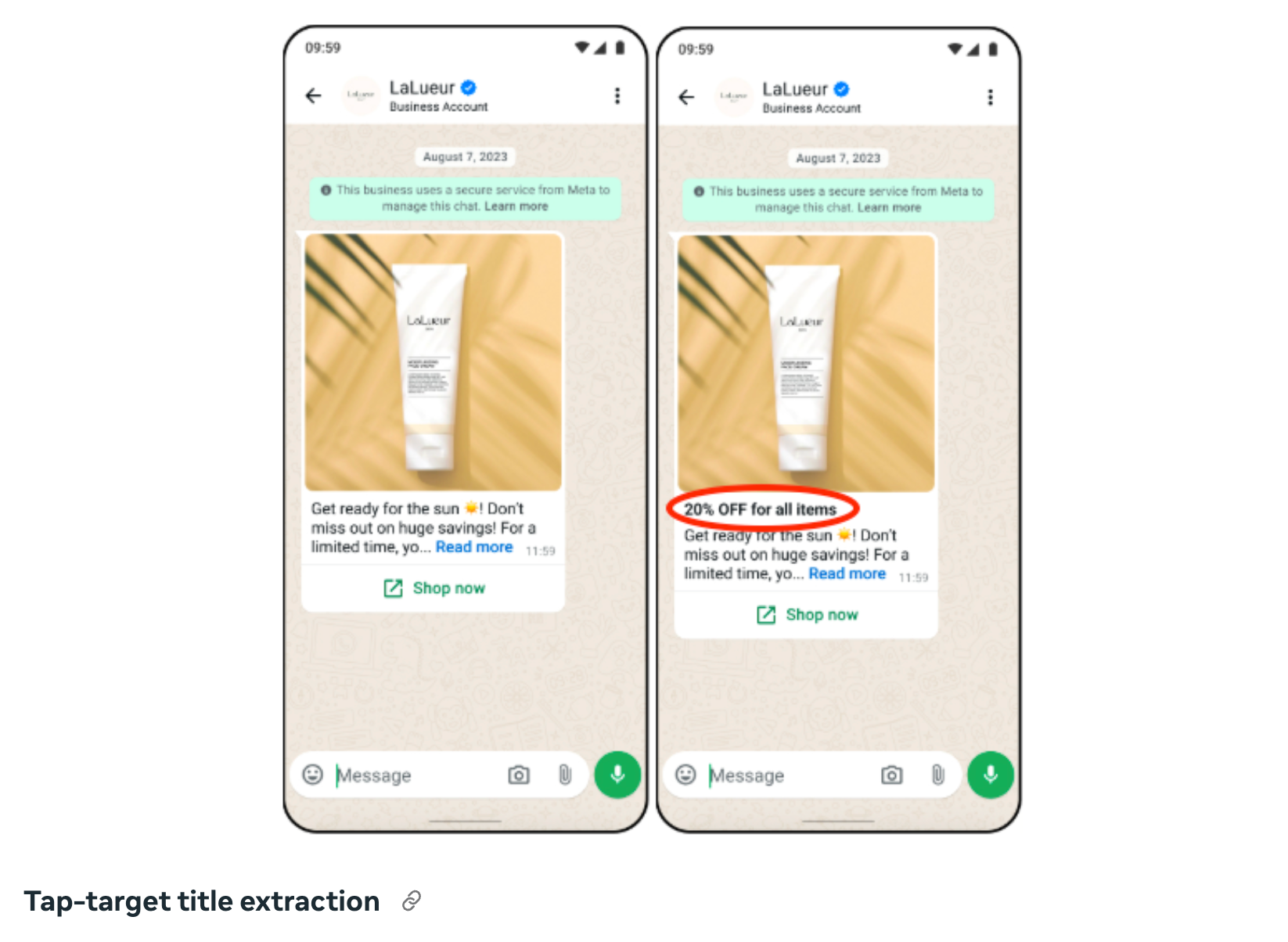
2. Tap-Target Title Extraction

In certain cases, ACO incorrectly interprets promotional phrases.
Example:
A message containing “20% better results” was altered to appear as “20% off”, leading to misleading communication.

These issues may cause unintended message variations or incorrect promotional claims.

For more details on ACO, refer to Meta’s official documentation:
https://developers.facebook.com/docs/whatsapp/marketing-messages-api-for-whatsapp/sending-messages#configure-automatic-creative-optimizations--whatsapp-business-account-level

Netcore’s Action

To prevent disruption to customer campaigns, Netcore has disabled ACO for all WhatsApp Business Accounts (WABAs) under our platform.

This includes turning off:

  • Automatic Creative Optimization

  • Text Optimization

  • Tap-Target Title Extraction

If you continue seeing unexpected formatting or title changes in your delivered WhatsApp templates:
➡️ Please write to the Netcore Helpdesk immediately.
Our team will review your WABA configuration and escalate to Meta if required.

New Feature

Transform your Images with our new Advanced Image Editor! 🎉

Get ready to create stunning visuals with our brand-new Image Editor (Unified Content Editor)!

  • Auto-size and Resize: Perfectly fit images for any device.
  • Crop, Transform, and Filters: Enhance and customize with ease.
  • Text, Shapes, and Draw: Add a creative touch your way.
  • Image-on-Image & Rounded Corners: Layer and style like a pro.

This update is all about freedom, creativity, and impact—no extra tools needed. Start transforming your images today! 🚀

To know more, read Documentation.

New Feature

Boost Security with Two-Factor Authentication (2FA)

Hi There,

We are excited to announce the availability of Two-Factor Authentication (2FA) for enhanced account security on the Netcore CE platform. This additional layer of security helps protect your account and sensitive data by requiring two forms of identification during login.

What is 2FA?

Two-factor authentication strengthens your account security by requiring:

  1. Your username and password

  2. A code generated by an authenticator app (e.g., Google Authenticator, Microsoft Authenticator)

    This ensures that your account remains secure even if your password is compromised.

2FA Methods Available:

  • Via App Code-Based Authentication: Use an authenticator app like Google Authenticator or Microsoft Authenticator to generate a secure OTP. (Recommended for enhanced security)

  • Via Email OTP Authentication: Receive a one-time password at your registered email address.

  • Backup Codes: A set of 10 single-use codes for emergency login scenarios.

Setting Up 2FA

  • For Admin Users: The CE panel admin must log in and configure 2FA methods in the Account Configuration section.

  • For Non-Admin Users: After logging in to a 2FA-enabled panel, follow the on-screen instructions to set up app-based authentication or email OTP authentication.

For detailed step-by-step instructions, refer to our 2FA Setup Guide.

Why Enable 2FA?

Enabling 2FA secures your account and ensures uninterrupted access to your marketing automation platform. With this feature, we’re committed to helping you protect sensitive information and maintain operational integrity.

Still Need Help?

If you have any questions or need assistance during this transition, please contact our support team at [email protected]. Or visit 2FA Setup Guide

We appreciate your continued partnership and look forward to serving you even better in the future. 

New FeatureComing Soon

Amazon S3 Integration (Reports Export Only)

Overview:

We're excited to announce the release of Amazon S3 integration for reports export. Simply configure your S3 bucket details within the Netcore CE panel, and you are ready to automate the export of campaign, journey, and on-site messaging reports directly to the designated S3 bucket. This integration eliminates the need for manual setup of Amazon S3 via PS.

Key Features:

  • Effortless Report Export: Automate report delivery to your S3 bucket, eliminating manual downloads and saving valuable time.
  • Enhanced Analytics Capabilities: Leverage your existing data analysis tools by storing reports in your S3 bucket. Utilize powerful analytics platforms like Amazon Athena or integrate with your data lake for comprehensive analysis.
  • Scalability and Security: Benefit from S3's unmatched scalability and robust security features to ensure your reports are stored securely and can grow with your data needs.

Benefits:

  • Streamline your workflow with automated report delivery.
  • Unlock the full potential of your existing data analysis tools.
  • Gain deeper customer insights through analysis of comprehensive data in your S3 bucket.
  • Make data-driven decisions with customizable dashboards built from your S3 data.

Use Cases (for this initial release of reports export):

  • Analyze campaign performance alongside website traffic data stored in your S3 bucket.
  • Gain insights into customer journeys by combining journey data with product purchase data stored in your S3 bucket.
  • Develop custom reporting dashboards directly from your S3 data for data-driven decision making.

For more information:

New Feature

Coupon Distribution (Email Channel Only)

Overview:

We are thrilled to announce the launch of the new Coupon Distribution feature, exclusively available for the email channel. This enhancement allows you to easily distribute personalized coupon codes directly through your email campaigns, offering a seamless way to boost engagement and drive conversions with minimal effort.

Here is an introduction video

Key Features:

  1. Email-Based Coupon Distribution: You can now upload both dynamic and static coupon codes for your email campaigns, offering flexibility in delivering personalized or general discounts and promotions. Additionally, you can set up alerts to notify you when coupon stocks are running low, ensuring you stay on top of distribution needs.
  2. Automated Coupon Allocation: Automatically assign unique coupon codes to each recipient based on pre-defined rules. Whether using dynamic or static coupons, this feature ensures precise and targeted coupon distribution, enhancing the effectiveness of your email marketing efforts.
  3. Customizable Email Templates: Leverage customizable email templates designed for seamless integration of coupon codes. Dynamic fields auto-populate customer information and coupon details, streamlining the personalization process for each recipient, while maintaining consistent branding and messaging.
  4. Expiration, Availability & Usage Monitoring: Set expiration dates for both dynamic and static coupons and monitor their usage and availability in real-time. You can also configure alerts to notify you when coupon stocks are near depletion, helping you maintain control and manage promotions without interruption.

Benefits:

- Boosted Email Engagement: Including personalized coupons in your email campaigns is proven to increase open rates, click-throughs, and conversions, helping you connect with your audience more effectively.

- Effortless Automation: By automating coupon code allocation, you eliminate manual tasks and ensure every customer receives the right offer without additional overhead.

We’re confident that this new feature will elevate your email marketing efforts and help you achieve better results. For more information,

Please refer to our detailed documentation here.

Coupon Distribution Documentation
New Feature

DLT Mandate: URL Whitelisting in SMS Templates

With effect from 1st October, TRAI has introduced new guidelines for the use of URL shortening in SMS templates under the DLT platform. To comply with these guidelines, each unique URL shortening domain-sender ID combination must be whitelisted in the DLT portal. Applicable only to Indian feed IDs. Below is an explanation and steps to follow.

Key Updates:

  1. URL Domain-Sender ID combinations: Combinations with applicable URL shortening domains - nmc.sg, nc6.in must be whitelisted along with their respective sender IDs. e.g. http://nmc.sg/ABCDEF/
  2. If you are using custom domain for shortening, the additional combinations also must be whitelisted in DLT. Suppose you have abc.ef as custom domain & ABCDEF as the sender ID e.g. http://abc.ef/ABCDEF/should also be whitelisted

Example 1:

  • SMS Text: Hi There, your Weblink is http://nmc.sg/ABCDEF/*********
  • Template Registered on DLT Portal: Hi There, your Weblink is {var}
  • Sender ID: ABCDEF

Example 2:

  • SMS Text: Hi There, your Weblink is http://nc6.in/ABCDEG/*********
  • Template Registered on DLT Portal: Hi There, your Weblink is {var}
  • Sender ID: ABCDEG

Using Multiple Sender IDs

If you are using three sender IDs (ABCDEF, ABCDEG, ABCDEH) with Netcore’s shortening service, you will need to whitelist at least 6 combinations (2 domains * 3 sender IDs) to ensure proper SMS delivery.

Example URLs to be Whitelisted:

  • http://nmc.sg/ABCDEF/
  • http://nmc.sg/ABCDEG/
  • http://nmc.sg/ABCDEH/
  • http://nc6.in/ABCDEF/
  • http://nc6.in/ABCDEG/
  • http://nc6.in/ABCDEH/

Important for Promotional Feed IDs:

To ensure compliance, you must add a 6-character uppercase alphabetic value to the "Promo shortening header" in the CE Panel under Profile > Account Configuration > Advanced Features. This value should identify your brand and be added as a header to the corresponding Feed ID in the DLT portal. For example:

  • Brand: ABC
  • Feed ID: 999999
  • Promo shortening header: ABCDEF
  • URL to Whitelist: http://nc6.in/ABCDEF/

Ensure that all combinations of sender IDs and shortening domains are whitelisted to avoid SMS delivery disruptions. This change is mandatory starting 1st October.