
What's New

Follow new updates and improvements to Netcore CE.

EnhancementsEnhancementComing Soon

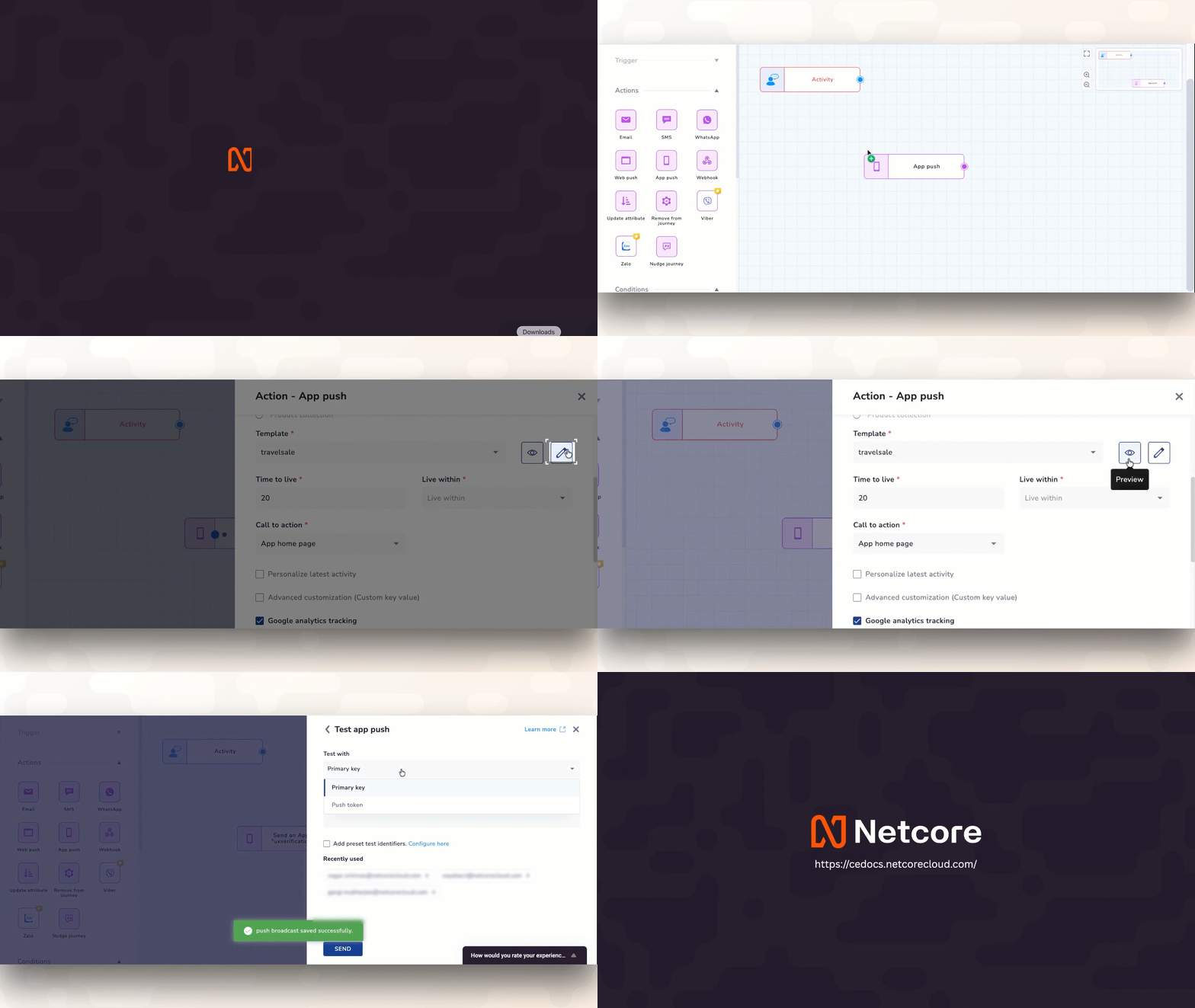
Build and Test App Push Notifications Without Leaving Your Journey

Designing multi-step customer journeys requires absolute focus. To speed up your setup, we have brought full template control directly into your App Push (APN) step, matching the exact, seamless workflow you already use for building Email actions. No more bouncing between tabs, navigating menus, or losing your place just to create or fix a notification.

What’s New

  • Create a brand-new push notification or tweak an existing one directly from the journey map, with Instant Creation and On-the-Fly Editing, letting you update the master copy or safely duplicate it so you don't disrupt other active campaigns.

  • Get Instant, Live Previews to see exactly how your text, images, and deep links will look on user devices before your journey goes live—no guessing required.

  • Blast a quick test notification to your test profiles directly from the node you are editing, giving you Fail-Safe Testing in Seconds, and validate your personalization tags and logic on a real device instantly.

Why It Matters

By unifying your design, editing, and testing inside a single workspace, you eliminate configuration errors and launch automated campaigns significantly faster. It’s a familiar, frictionless setup that gets your ideas live in minutes, not hours.

Refer to Documentation

Coming Soon

Immediate Action Required: PE-TM Chain Binding on DLT as per TRAI Mandate for SMS

As of 1st December 2024

all Principal Entities (PEs) must comply with the TRAI mandate to disclose the entire chain through which SMS communications are routed, including all Registered Telemarketers (RTMs) involved. Failure to meet this requirement may result in complete SMS delivery failures starting from this date.

Action Required by Principal Entities:

  1. Log in to your respective DLT portal.

  2. Select "Chain" on the dashboard (similar options are available with each operator).

  3. Enter "Netcore Cloud" as the Telemarketer with TM ID 1502444440000011444 and submit the request.

  4. Approval by Netcore: Netcore Cloud, as the designated Telemarketer (DF-Delivery Function), will review and approve your request.

  5. Final Confirmation: After Netcore’s approval, please log in again to your DLT portal as the Principal Entity (PE) to provide final confirmation and complete the PE-TM chain binding.

This update is mandatory starting 1st December 2024.

For more detailed guidance, please click below to download the User Manuals.

User Manual

For any further clarification, please feel free to contact us at [email protected]

New FeatureComing Soon

Amazon S3 Integration (Reports Export Only)

Overview:

We're excited to announce the release of Amazon S3 integration for reports export. Simply configure your S3 bucket details within the Netcore CE panel, and you are ready to automate the export of campaign, journey, and on-site messaging reports directly to the designated S3 bucket. This integration eliminates the need for manual setup of Amazon S3 via PS.

Key Features:

  • Effortless Report Export: Automate report delivery to your S3 bucket, eliminating manual downloads and saving valuable time.
  • Enhanced Analytics Capabilities: Leverage your existing data analysis tools by storing reports in your S3 bucket. Utilize powerful analytics platforms like Amazon Athena or integrate with your data lake for comprehensive analysis.
  • Scalability and Security: Benefit from S3's unmatched scalability and robust security features to ensure your reports are stored securely and can grow with your data needs.

Benefits:

  • Streamline your workflow with automated report delivery.
  • Unlock the full potential of your existing data analysis tools.
  • Gain deeper customer insights through analysis of comprehensive data in your S3 bucket.
  • Make data-driven decisions with customizable dashboards built from your S3 data.

Use Cases (for this initial release of reports export):

  • Analyze campaign performance alongside website traffic data stored in your S3 bucket.
  • Gain insights into customer journeys by combining journey data with product purchase data stored in your S3 bucket.
  • Develop custom reporting dashboards directly from your S3 data for data-driven decision making.

For more information:

EnhancementComing Soon

Ability to filter bot openers from email campaigns

Email performance has been adversely affected due to a mixture of genuine user opens and bot opens (including Apple and Google bots). This has led to poor email performance concerns.

To address this, a new enhancement is being implemented that allows better segmentation & suppression of email opens based on user behavior and bot activity.

A ready-to-use system-created segment called “Exclusive Bot Openers” will be made available by default on the CEE platform. This segment will allow marketers to differentiate between user opens and bot opens, contributing to accurate performance measurement and data-driven decisions.

Marketers can use this segment to suppress bot openers from their future email campaigns and target only valid user openers.

Path to discover this: Audience > Segment > Exclusive Bot Openers

PS Note: This enhancement is being done at present only in the segmentation module. It focuses on improving email performance tracking by enhancing segmentation options. It ensures accurate performance measurement and data integrity while considering genuine user opens and bot opens.

Image #1
Coming Soon

Upcoming - Multi-Number Support for WhatsApp - Campaigns and Journeys

We are going to introduce support for multi-number support for campaigns and journeys, allowing users to send communications via different mobile numbers.

Previously, one CEE panel was mapped with one CPASS panel, and one CPASS panel supported multiple mobile numbers. Now, we are extending this support to campaigns and journeys, enabling the selection of specific numbers for communication.

Impact Areas:

Number Display: The selected number will be shown on hover of Campaign Listing and Journey WhatsApp Nodes with the placeholder "Sent from: XXXXXXXXXX". Node hover will also reflect the selected number.

Test Message: Test messages will be fired from the selected number.

Campaign Preview: The Campaign Preview page will display "Sent Via: XXXXXXXXXX" to indicate the selected number.

Reporting: A new column, "Sent Via" or "Sender ID," will be introduced in the Summary and Detailed Reports of campaigns. The Detailed Summary Report and Phase 2 - Nodewise/Channelwise report will also show "Sent Via" information.

Image #1
Image #2

Follow this space for more updates on this release!

Coming Soon

Configurable Conversion Window

Overview:

In response to the marketing industry's need for accurate measurement of conversions and revenue attribution, we are introducing a new feature called Configurable Conversion Window. This feature allows marketers to define the conversion window for their campaigns, enabling them to analyze campaign performance based on business metrics such as the number of conversions and revenue generated.

Background:

Marketers increasingly focus on business metrics rather than traditional health indicators like opens and clicks. The last-click attribution model, where the most recent campaign click receives 100% credit, is widely favored by marketers. Additionally, the time taken by users to make purchasing decisions varies for different products, with some requiring swift decisions and others needing more time.

Feature Details:

The Configurable Conversion Window feature provides marketers with the flexibility to set the conversion window for their campaigns and journeys. The conversion window logic is based on the campaign clicked date/time, not the campaign publish date/time.

Key Functionality:

  • Customizable Conversion Window: Marketers can define the period during which conversions will be tracked for a specific campaign or journey. This allows for accurate analysis of business performance based on the defined conversion window.
  • One-Day Conversion Window: In cases where a one-day conversion window is set, and multiple campaigns are executed on the same day, the last-clicked campaign will receive 100% credit if a user makes purchases after clicking on multiple campaigns.
  • Conversion Tracking Period: Conversions will be tracked for 60 days from the campaign/journey send date, ensuring a comprehensive analysis of long-term campaign performance.
  • Auto-Correction of Data: If a user clicks on two campaigns/journeys with the same conversion goal in the same day and makes a purchase, the conversion will initially be attributed to both campaigns. However, the system will automatically correct the data at midnight, ensuring that the attribution goes only to the latest clicked campaign.
  • Conversion Attribution for Journey and Broadcast Campaigns: If a user is in a journey control group and receives a broadcast with the same conversion goal, clicks on both, and makes a purchase, the conversion will be attributed to both the journey and the broadcast campaign.

Roll-out Plan:

The Configurable Conversion Window feature will be rolled out gradually, with access available to all customers by the end of May. The release will commence next week, allowing marketers to start leveraging this powerful functionality.

Refer the snapshot:

Image #1

To learn more about this feature and its implementation, please refer to the detailed documentation available at
Coming SoonEnhancement

Campaign report export status UI and DIY download

We're excited to announce the release of our latest feature: the campaign report export status UI and DIY download screen!

The given screen on the CEE platform is already live and ready to use.

To access the same: From Left Menu > Profile > Export Logs >

With this new feature, you'll be able to view the status & download your requested campaign reports with ease. Our new export UI is intuitive and user-friendly, making it easier than ever to track your progress.

The DIY download screen gives you even more control over your downloads, allowing you to select reports generated and download when you required saving time and increasing productivity.

PS Note: -

  1. Above screen is available only on IA 2.0 Menu.
  2. At present, this UI will have a listing for campaign reports, journey reports will be added in the future.

We hope you'll find this new feature useful. If you have any questions or feedback, please don't hesitate to contact our support team at [email protected]

Read More

Coming Soon

Message Deduplication

Message Deduplication

Message deduplication is the process of removing duplicate messages from a campaign. In the context of messaging systems, such as email, SMS, WhatsApp, message deduplication ensures that only single copy of message is delivered to recipients, avoiding unnecessary duplication.

Image #1

How it works?

Following are the 3 scenarios:

  • This capability is accessible for Email, SMS, and WhatsApp broadcast campaigns if the panel's primary key (PK) is Customer ID (essentially any key other than email address and mobile number).
  • If the panel's primary key (PK) is Email Address, this capability is available for SMS and WhatsApp broadcast campaigns.
  • If the panel's primary key (PK) is Mobile Number, this capability is only available for Email broadcast campaigns.
  • This feature is only available to IA 2.0 clients.
  • When the campaign is at the Draft stage, the customer can make changes to the setup.
  • When the campaign is in the Sent stage, the customer cannot alter the configuration.
  • When you enable "Deduplication" at the campaign level, the system will automatically suppress duplicates (email addresses or mobile numbers) based on the channel. The system will select an email address or mobile number at random from the list/segment, but only one copy of the message will be delivered to the recipient.
  • Suppression records will not be counted in metrics such as Published or Sent.
  • The system will consider "Deduplication" when calculating the number of reachable users for a campaign.
  • When both the Deduplication and Frequency cap features are active for a campaign, the system will first apply deduplication logic and then frequency cap logic.
  • When you enable deduplication for a campaign, you will not be able to choose User Data Tables (UDT) for targeting under the Audience section.

Roll-out plan: The feature will be accessible to all customers by the end of May, with the release beginning next week.

Coming Soon

Default landing page changed to Unified Campaign Listing

As part of our ongoing efforts to enhance performance, we have updated the default landing page from the Home dashboard to the Unified campaign listing page. This change will improve panel performance, leading to a faster and smoother experience for our users. We are committed to continuously improving our platform's performance and user experience, and we believe this change will be a positive step in that direction.

As always, we welcome feedback from our users and are happy to answer any questions you may have.

Coming Soon

Improved carousels in AMP editor!

We are excited to announce a new release in our AMP editor with improved carousel functionality. You can now resize carousel images to match your desired dimensions. Additionally, the editor will provide recommended height/width for a perfect fit.

We are also adding an option to display a carousel thumbnail preview below each carousel for a better user experience.

Image #1
Image #2

Start creating customized AMP templates with more control and flexibility. Happy designing!