What's New

Follow new updates and improvements to Netcore CE.

Using Segment Agent Just Got Easier!
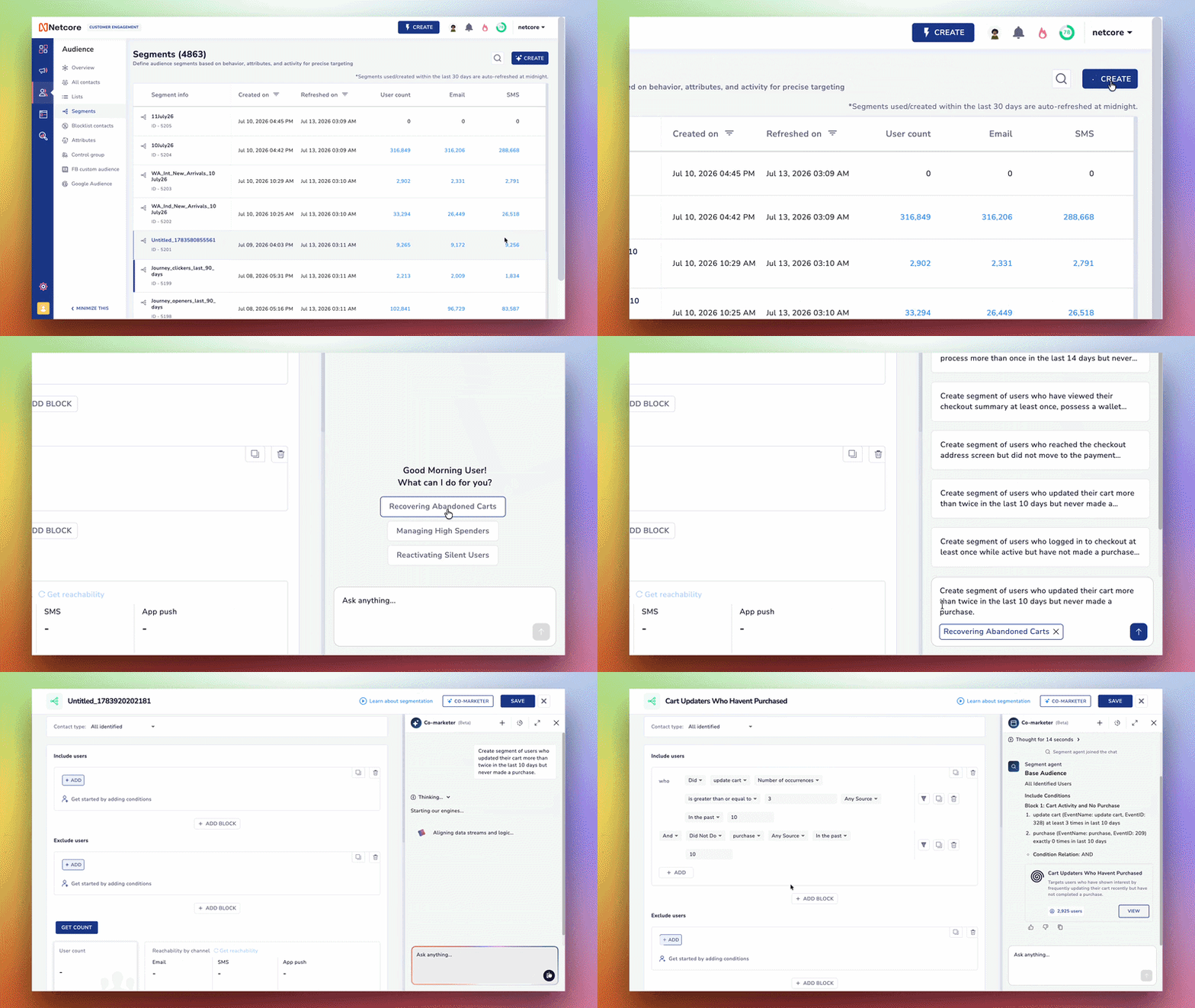
Building a segment used to mean a blank prompt box and a lot of guesswork about where to start. Now Segment Agent does the thinking for you. It reads the segments you already use to send campaigns on the panel, hands you ready-to-run prompts built around them, and returns a complete segment in about 25 seconds.

What's New

• Prompts built from the segments you already run put a relevant starting point in front of you the moment you open Segment Agent. It reads the segments you use to send campaigns on the panel, so every suggestion maps to a use case you actually work with rather than a generic template.

• Themed suggestions like Digital Channel Engagement and Active Product Interest group those prompts so you can explore by intent instead of typing from scratch. Pick one, adjust the wording if you want, and you are ready to build.

• A complete segment in about 25 seconds lands the moment you send a prompt. Segment Agent assembles the include and exclude conditions and returns a live user count, ready to save.

Why It Matters Segment Agent makes trial and error into a few clicks and putting more relevant, campaign-aligned segments within reach before each send. The marketers who lean on it ship sharper targeting faster. Everyone else is still hand-building blocks.

Open Segment Agent and pick a prompt to build your next audience in seconds.
Enhancements

Build and Test App Push Notifications Without Leaving Your Journey

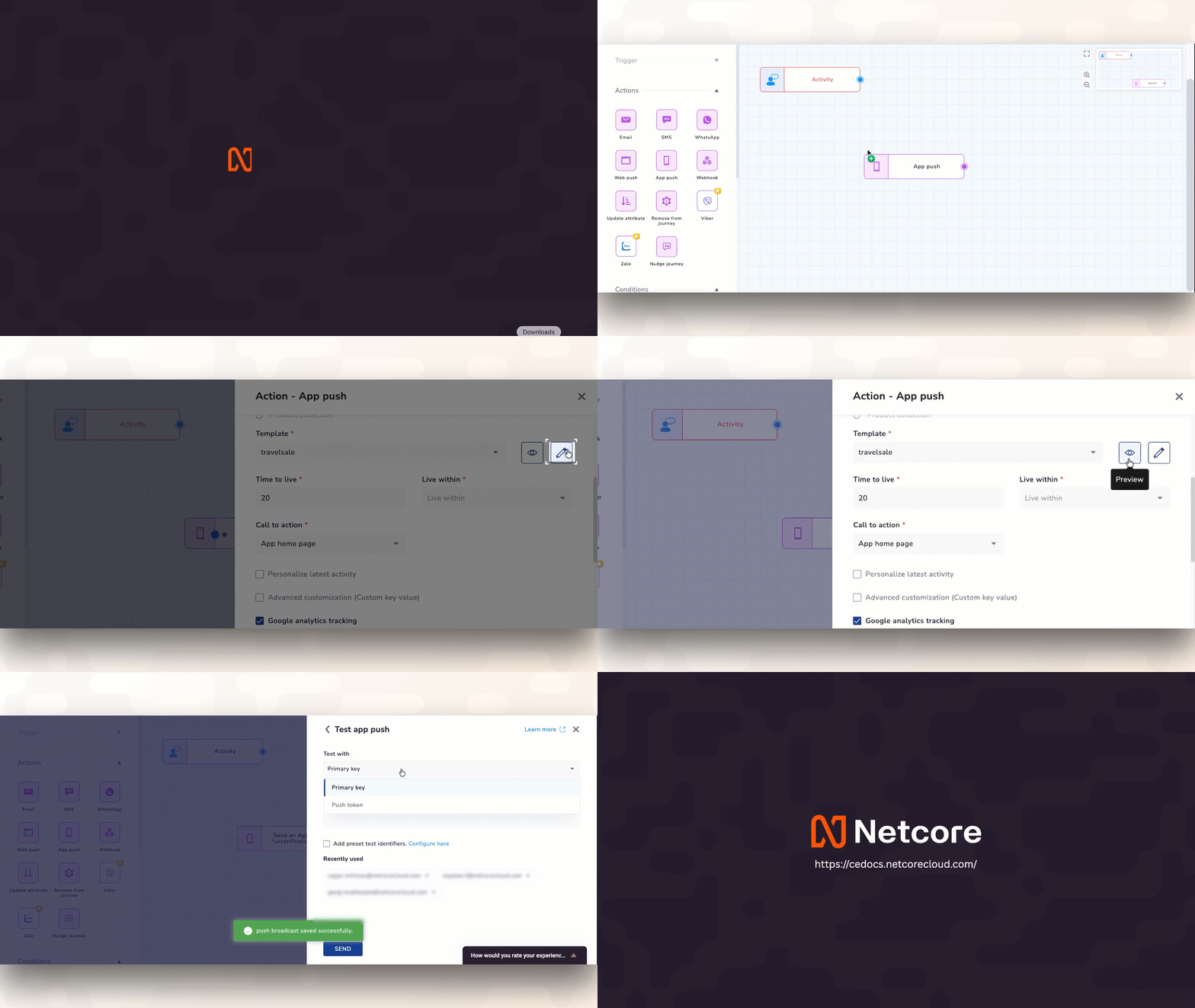
Designing multi-step customer journeys requires absolute focus. To speed up your setup, we have brought full template control directly into your App Push (APN) step, matching the exact, seamless workflow you already use for building Email actions. No more bouncing between tabs, navigating menus, or losing your place just to create or fix a notification.

What’s New

  • Create a brand-new push notification or tweak an existing one directly from the journey map, with Instant Creation and On-the-Fly Editing, letting you update the master copy or safely duplicate it so you don't disrupt other active campaigns.

  • Get Instant, Live Previews to see exactly how your text, images, and deep links will look on user devices before your journey goes live—no guessing required.

  • Blast a quick test notification to your test profiles directly from the node you are editing, giving you Fail-Safe Testing in Seconds, and validate your personalization tags and logic on a real device instantly.

Why It Matters

By unifying your design, editing, and testing inside a single workspace, you eliminate configuration errors and launch automated campaigns significantly faster. It’s a familiar, frictionless setup that gets your ideas live in minutes, not hours.

Refer to Documentation

No More Rebuilds: Edit Scheduled and Suspended Campaigns in One Place

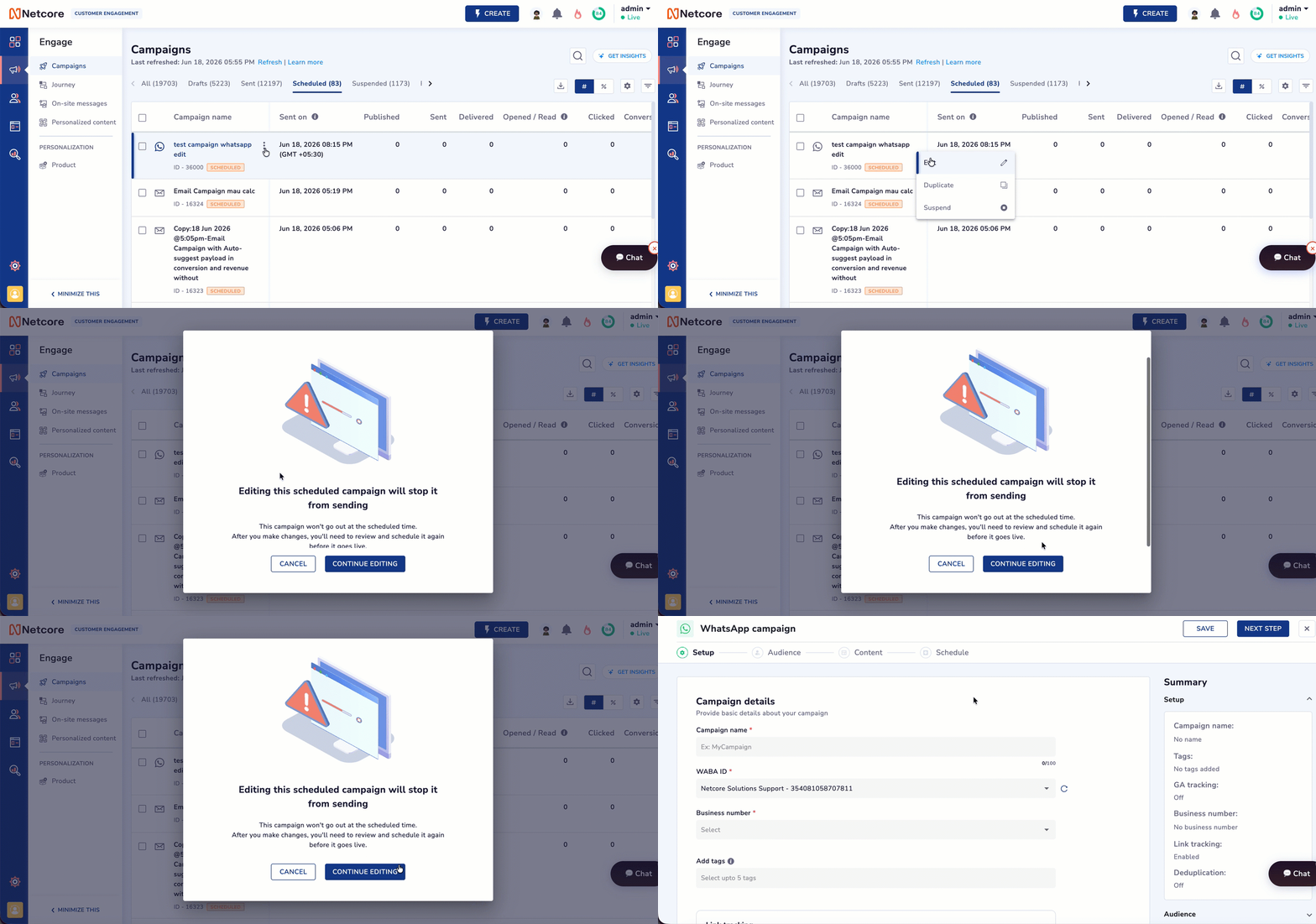
Campaigns used to be locked the moment you set them. One small change meant a four-step detour through suspend, clone, edit, reschedule, and a real chance of shipping the wrong version. Now, Netcore CE scheduled and suspended campaigns can be edited in a simple workflow.

What's New

  • One-click edit, not a four-step workaround. Open any scheduled or suspended campaign, click Edit, make the changes you need, and save.

  • Every field is fair game. Update Setup, Audience, Content, or Schedule in the campaign you already built, then reschedule with a single publish.

  • A safety window that protects your sends. Editing stays open until 15 minutes before send, so last-minute fixes never collide with a live campaign.

For example, your email is scheduled for 2:00 PM, and you spot a broken offer code at 1:20 PM. Instead of rebuilding from scratch, you open the campaign, fix the code, and reschedule in under a minute. The fix ships clean, with no duplicates left behind.

Important Points to Remember :

  • Send Time Optimization (STO)campaigns can't be edited, scheduled, or suspended.

  • Saving moves it to Draft: When you edit a scheduled campaign, it drops to Draft status and is removed from the send queue. A Draft campaign does not send until you reschedule it, so always reschedule after saving, or the ca’t go out.

  • The save is re-checked at save time: Opening the editor early does not buy you an unlimited save window. If the clock crosses into the final 15 minutes while you are editing, the save is blocked with an error, and your changes cannot be applied.

  • The campaign stays live until a successful save: Opening Edit does not pause the send. If you open Edit, keep editing past the scheduled time, and never save, the original campaign goes out as scheduled, and your unsaved changes are discarded.

For example, the campaign is scheduled for 2:00 PM. You click Edit at 1:30 PM and begin making changes. At 2:00 PM, you have not yet saved. The campaign will be sent at 2:00 PM as originally scheduled, and your unsaved changes will be discarded.

Why it Matters Every minute spent cloning and recreating a campaign is a minute your time-sensitive send sits in limbo, and every duplicate is one more chance to publish the wrong version. In-place editing turns a fragile, multi-step workaround into a single confident correction.

Refer here for the documentation.

Enhancements

Earlier updates