June 18th, 2026
Enhancements
Improvement
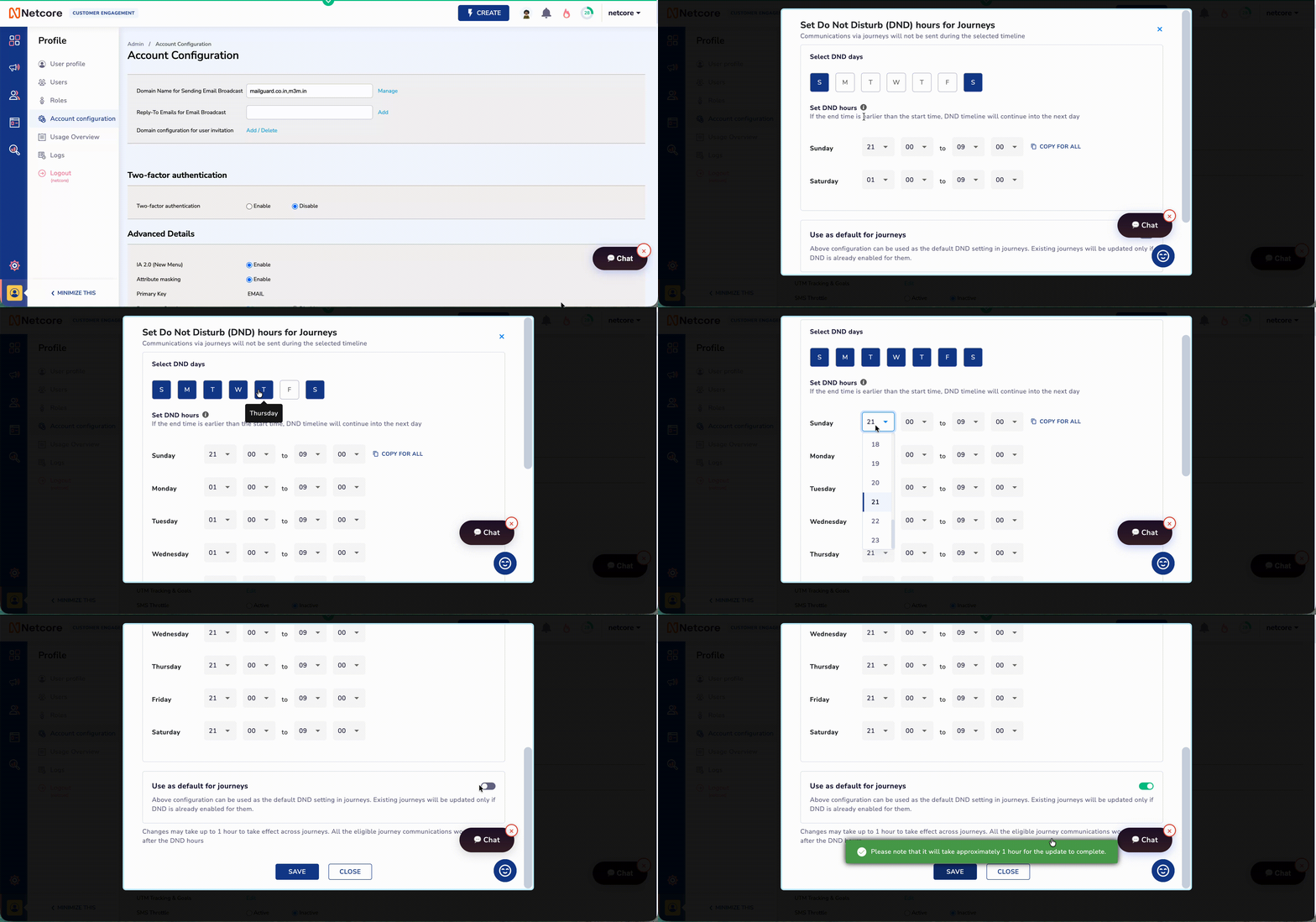
You can now configure Do Not Disturb windows separately for each day of the week, so your journeys only send messages during the allowed communication hours for that specific day.
For example, you can pause weekend communication completely, keep weekday messages active during business hours, or set different quiet-hour windows for high-engagement and low-engagement days.
What’s new
Choose the exact days when messages are allowed to go out.
Set different DND hours for each selected day.
Copy one day’s schedule across the week to save setup time.
Automatically hold messages triggered during quiet hours and send them when the next open window starts.
This helps you avoid disturbing customers at the wrong time, respect regional quiet-hour requirements, and continue delivering triggered journey messages without dropping them.
Go to Account Configuration to set up custom day-level DND windows for your journeys.
June 17th, 2026
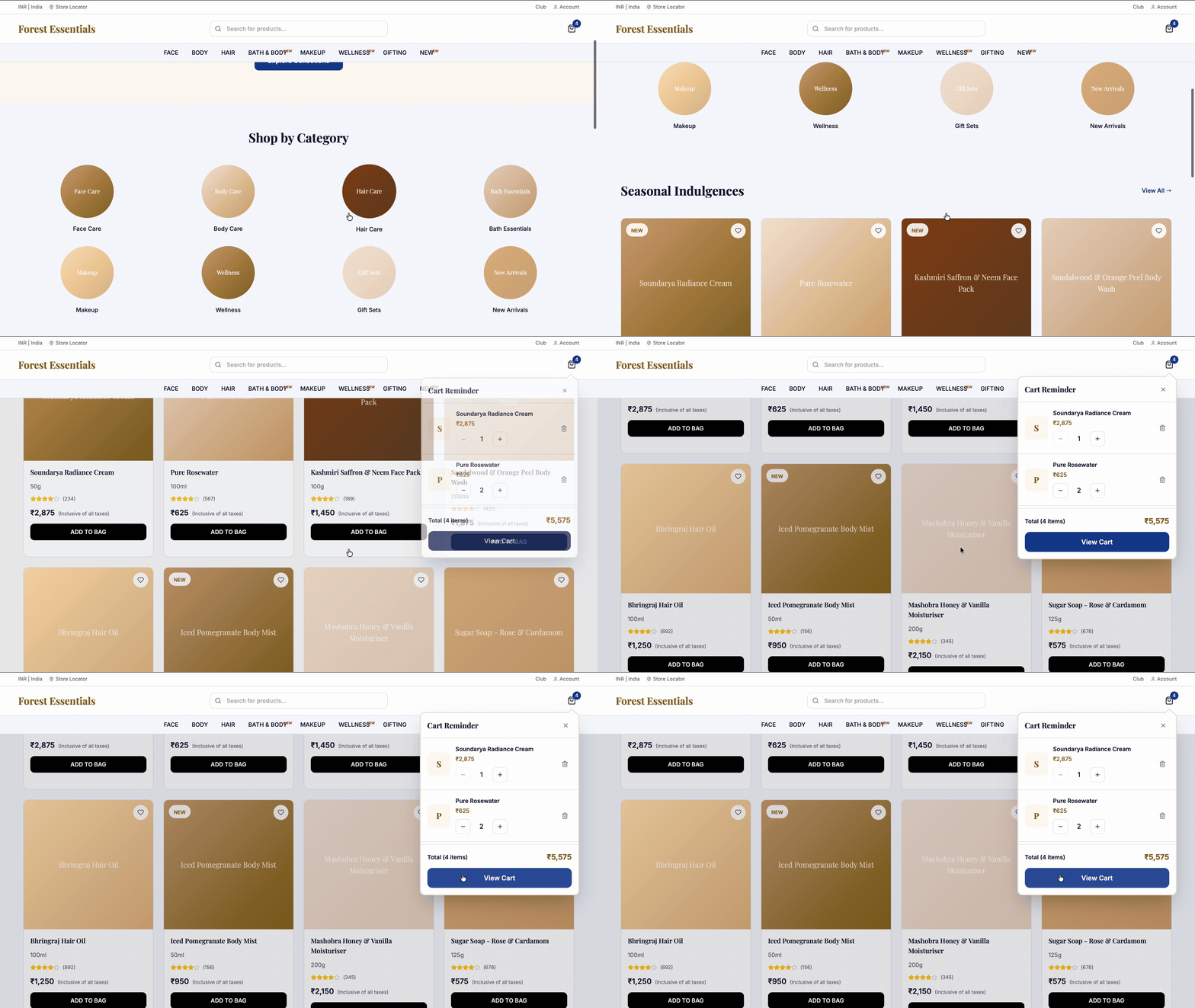
Most cart recovery solutions wait for an email to land hours after a shopper has moved on, losing the sale entirely. Netcore CE's Cart Reminder works in real time, showing a targeted message the exact second a shopper tries to leave your site. Stop waiting on slow CRM cycles to recover high-intent revenue before the tab closes.
What’s New
Automatically trigger Behavior-Triggered Nudges only when a shopper has items in their cart and shows signs of leaving.
Automatically feature Live Cart Visuals that display the exact product image, name, price, and total in the reminder so shoppers see precisely what they are about to leave behind.
Built-in Smart Suppression automatically turns off the reminder when it is no longer needed, such as when a customer empties their cart or completes a purchase, ensuring you never nag a buyer.
Easily customise Flexible Display Controls to limit how often reminders appear, so you stay helpful without being pushy.
Instantly access Clear Revenue Tracking to see exactly how many sales, clicks, and conversions Cart Reminder brings in with dedicated tracking built to measure your direct ROI.
Why It Matters
Every abandoned cart is revenue you already paid to acquire, lost at the doorstep. Operating on a delayed cycle means losing to short consumer attention spans. Engineered to drive a 15% click-through rate and a 5% to 8% conversion uplift, Cart Reminder captures the warmest intent possible to secure checkouts before the session ends.
Navigate to Web Personalisation and Enable Cart Reminder to start recovering revenue in real time.
Refer the documentation here.
June 3rd, 2026
Enhancements
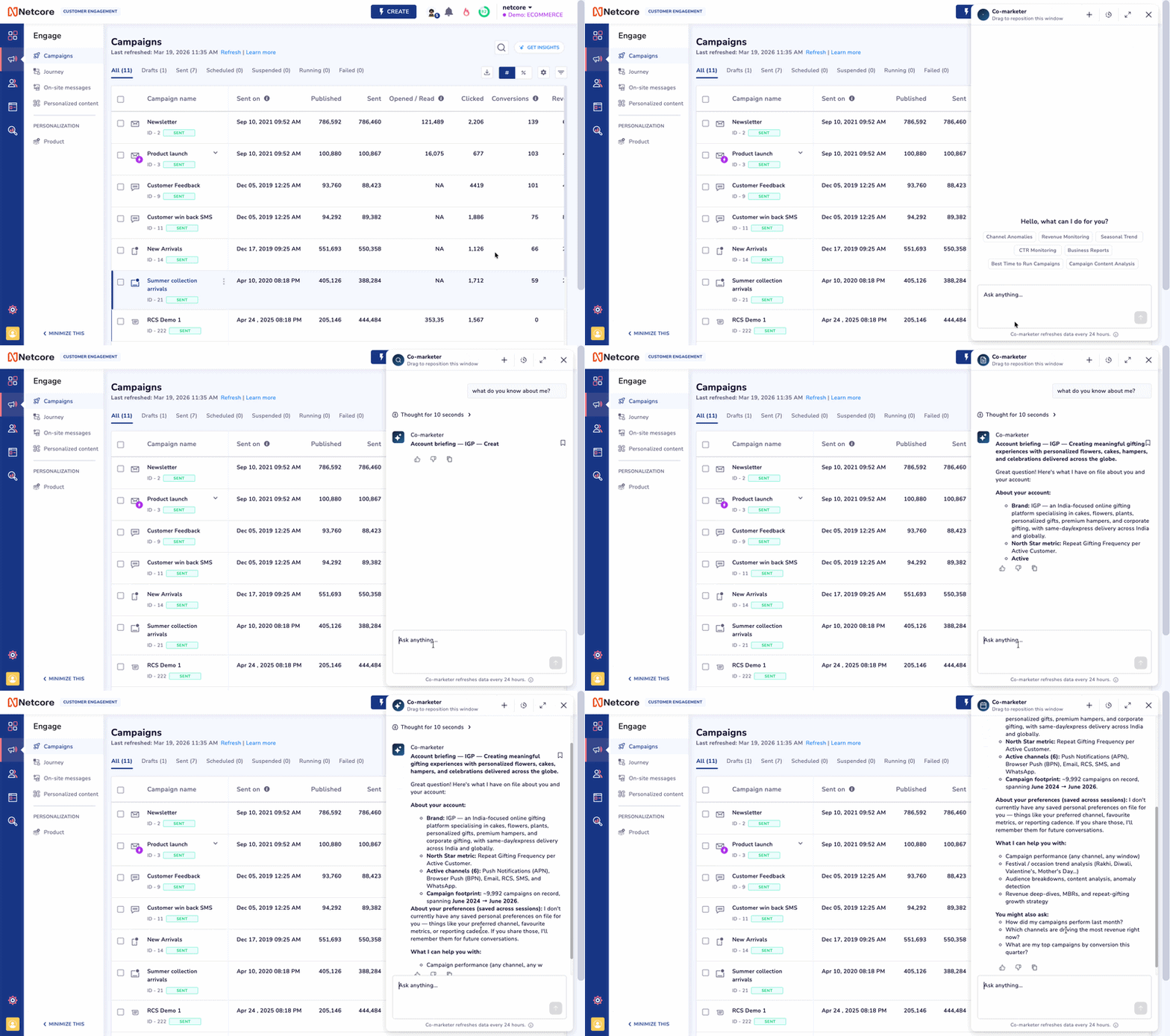
We have completely overhauled its core infrastructure to transform it from a basic query tool into an elite, personalized analytics partner. If you are still not using the Campaign Insight Agent daily, you are falling behind.
Instead of forcing you to hunt through dashboards or repeatedly type out the exact same filtering prompts, your insights assistant now acts like a seasoned data analyst who genuinely understands your specific role, your tracking preferences, and your workflow.
What’s New
We have drastically crushed latency across the board. Get Blazing Fast, Ultra-Precise, and highly accurate performance data and campaign breakdowns in seconds, rather than waiting minutes.
Mention your core target markets, geographic regions, or overarching brand goals once, and it locks that context intoLong-Term Memory. It will remember those exact preferences weeks and months down the line without ever needing a recap.
In a workspace with dozens of teammates, the agent seamlessly differentiates between teammates using its on the same panel Smart User Recognition ability and remember your specific account role and communication channels.
No two marketers prioritize the exact same numbers. The agent dynamically learns the specific KPIs you track most heavily and automatically leads with those metrics. When you ask for a campaign health check, the data points critical to your exact job are instantly pushed front and center.
The agent now serves up Data-Driven Suggested Prompts, refreshed daily for your panel. Rather than generic templates, it catches real shifts in your numbers and writes the question for you, like "Why did my email open rates drop from 16% to 9% over my last 5 campaigns, and is it my audience or my content?" Your most important question is waiting for you even before you type.
Why It Matters
The agent evolves more as you interact with it. Marketers who lean in right now are building a deeply customized, context-aware AI asset that automates the headache of daily reporting. If you skip this update, you are actively choosing to waste hours re-typing the same filtering questions, re-explaining your goals, and fighting with manual analytics panels.
Read the complete documentation here
May 29th, 2026
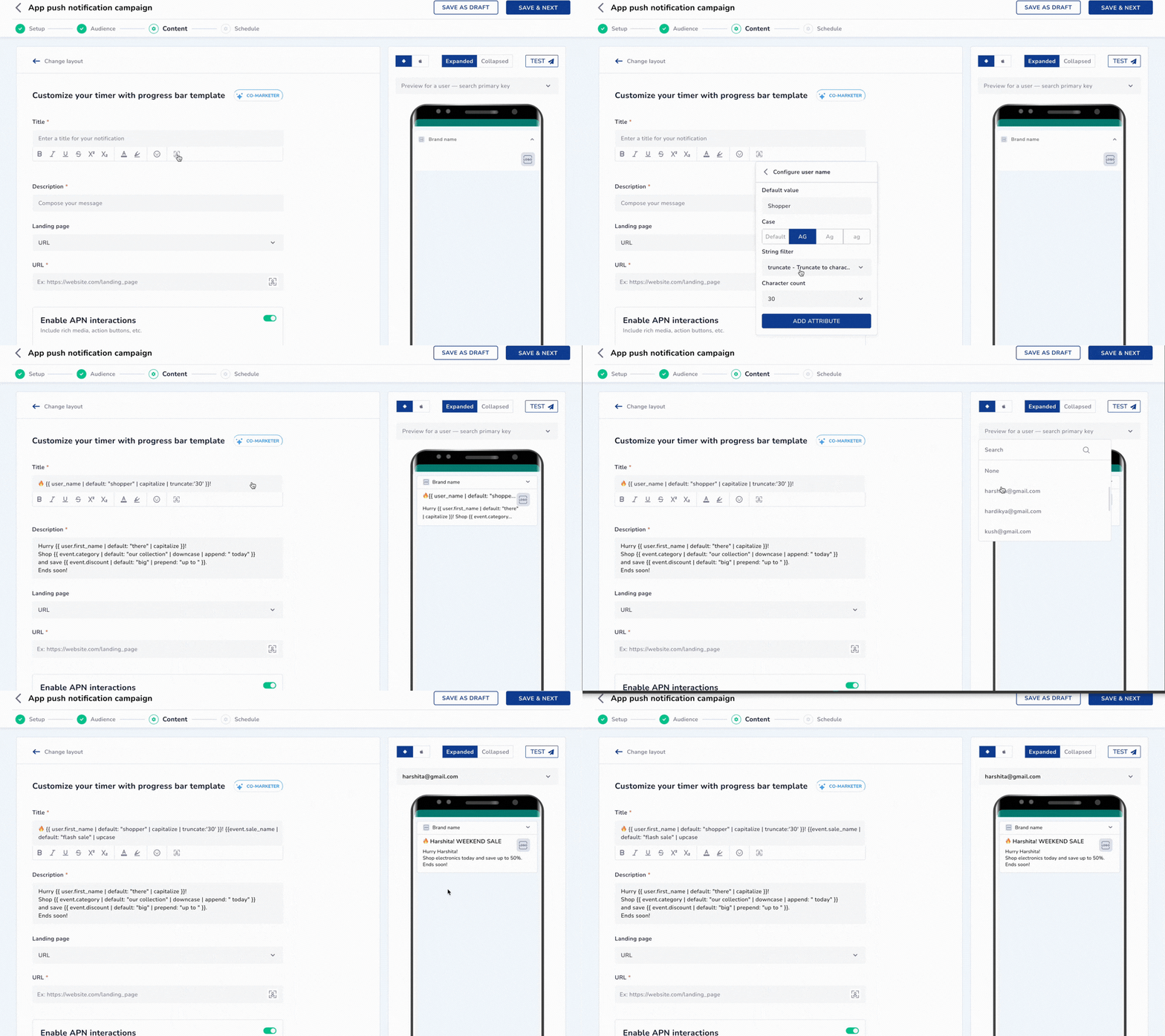
You want to send a Festive offer — 20% off for Gold members, free shipping for everyone else, in the user's preferred language, addressed by name. Today, that's four campaigns, four segments, four approvals.
With Liquid Tags, it's one template. Netcore renders the right version for every user at send time — automatically.
What's New
Personalisation tags: Pull any user attribute — name, city, loyalty tier, lifetime spend — directly into your message. Every recipient sees their own version.
Conditional messaging: Show different content to different users inside one campaign. Gold members see their points balance and an exclusive offer. Everyone else gets a different nudge.
Fallbacks: When an attribute is missing, the message gracefully substitutes a default value you define. No blank names. No broken copy.
Abort control: If a message can't go out without critical data — like a policy number — skip that user entirely and log the reason for review.
Note: Liquid Tags is available for App Push Notifications (APN) and WhatsApp in newly created campaigns and journeys. Email, SMS, and other channels are coming soon. To activate, contact your CSM or reach out to [email protected]
Existing campaigns are unaffected.
Refer to the Liquid Tags documentation to get started.
May 27th, 2026
Enhancement
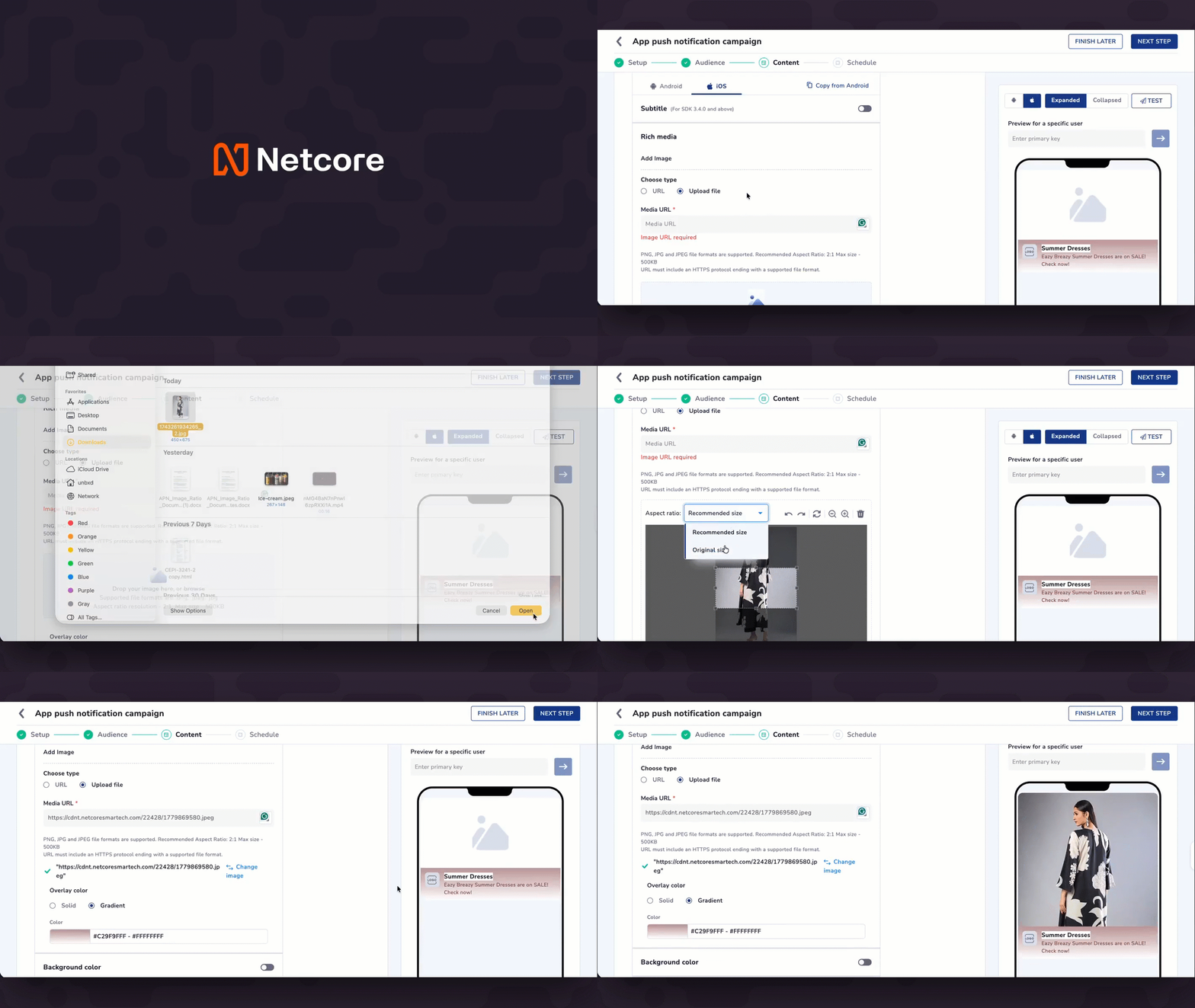
You no longer have to crop every iOS push image to 2:1. A new option lets you upload an image and display it exactly as-is — no resizing, no pixel loss — while the recommended 2:1 format remains available for campaigns where it fits best.
What's new
New image dimension option: When uploading images for iOS campaigns, choose between the recommended 2:1 ratio or keeping your image's exact uploaded dimensions — square, portrait, or panoramic.
All iOS rich media templates supported: Both options work seamlessly across all iOS App Push Notification (APN) rich media templates.
Note: Android push notifications continue to use the standard 2:1 format to maintain layout stability across devices.
Refer to the App Push Notification documentation here.
May 27th, 2026
Enhancement
App Push notifications now support significantly larger images, allowing for sharper, higher-fidelity visuals across all rich media templates on both Android and iOS.
With this enhancement, you can:
Upload single-image assets up to 500 KB (previously 40 KB).
Upload up to 100 KB per image for Carousel (max 5 slides) and Multi-Icon templates.
New and edited campaigns use the updated limits automatically. Existing campaigns are unaffected.
Check product documentation here.
May 20th, 2026
Improvement
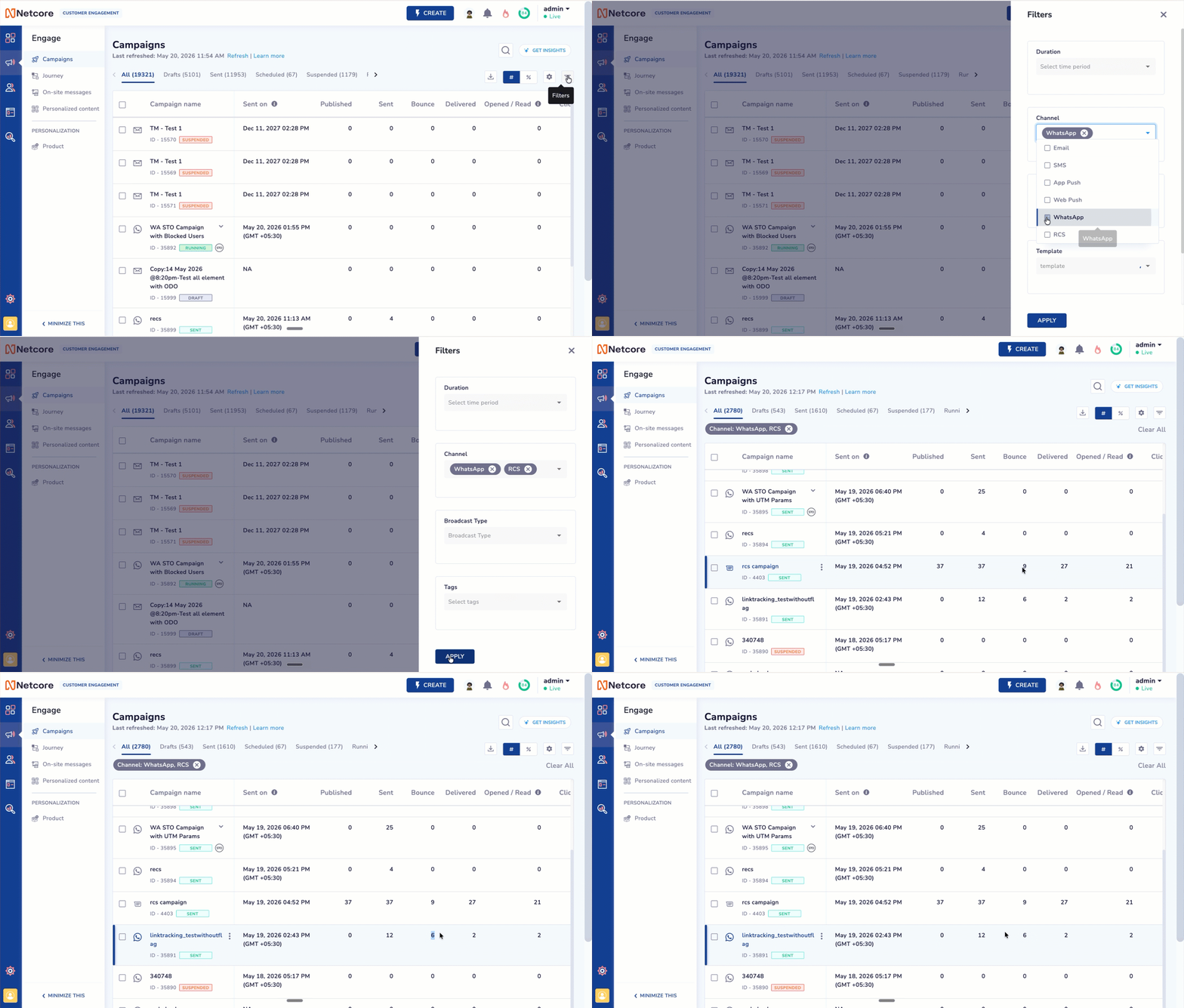
We have refined how message outcomes are reported for WhatsApp and RCS, aligning Netcore CE with industry standards. Previously, messages that could not be delivered, such as numbers that were not available on WhatsApp, were counted under Failed. This dragged down failed metrics, unrelated to the campaigns and journeys actual performance.
What is Changing
Made Sent a deterministic, Netcore-derived metric — no longer dependent on channel webhooks.
Clarified what Not Sent means and how it is reported.
Introduced a new Bounce metric for WhatsApp and RCS.
Updated the Failed % calculation to exclude bounced messages.
These changes apply uniformly across Campaigns and Journeys, across WhatsApp and RCS.
Impact Areas
You will see these changes reflected in:
Campaign Summary and Detailed Reports — for WhatsApp and RCS campaigns.
Journey Summary and Detailed Reports — for Journeys using WhatsApp and RCS nodes.
Campaign listing page — Bounce now appears as a reporting metric.
Heads up: After the release, your Failed count will reduce and Failed % may shift. This is expected — the underlying performance of your campaigns & journeys hasn’t changed, only how it’s reported. For more details, refer to detailed documentation.PS Note - It will be released on India IDC thursday (May 21) and next week it will be on EU and US idc.
May 6th, 2026
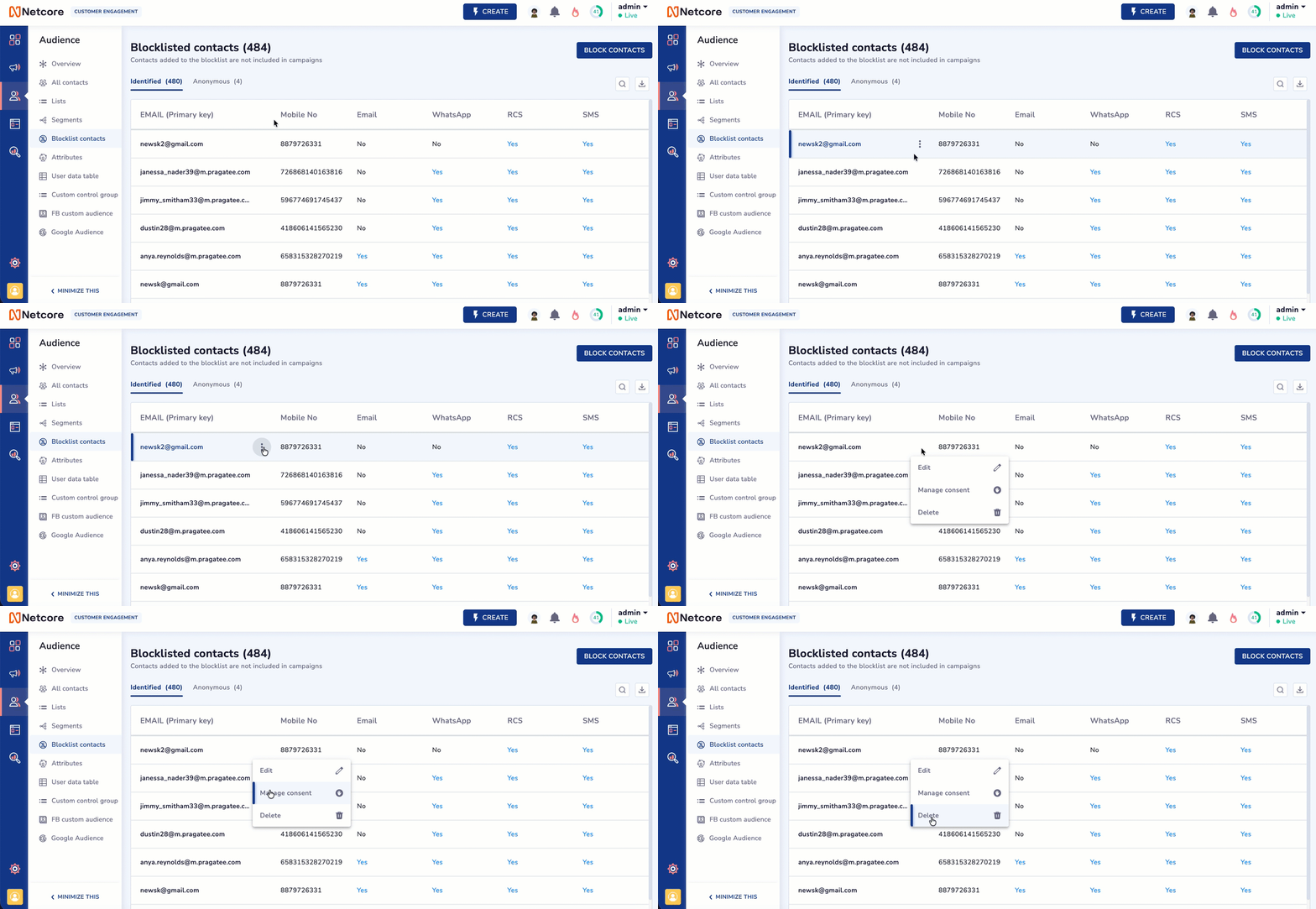
Managing who doesn't get your messages is just as important as who does. We have redesigned the Netcore CE Blocklist Contacts page to give you a faster, cleaner way to manage customer preferences and protect your brand reputation across every channel.
What’s New
Manage suppression for Email, SMS, WhatsApp, and RCS in a single, unified view, all Channels in one Screen
Add contacts manually for immediate suppression or use bulk upload for larger lists.
Opt-outs for WhatsApp and RCS now sync automatically, ensuring you never message a customer who has asked to stop.
Easily see the status of every contact, whether they are identified, users or anonymous visitors.
Contacts on your blocklist are now clearly marked as "Not Sent" in reports, giving you a crystal-clear view of your actual campaign reach.
Why It Matters
Keeping your lists clean is now faster and more reliable. By automating stop requests and unifying your view, you reduce the risk of compliance errors and ensure your messages only reach the people who want them.
Refer to the complete documentation here.
We will begin the feature roll-out this evening and continue over the next 2-3 days. As a result, you will notice updated screens.
April 29th, 2026
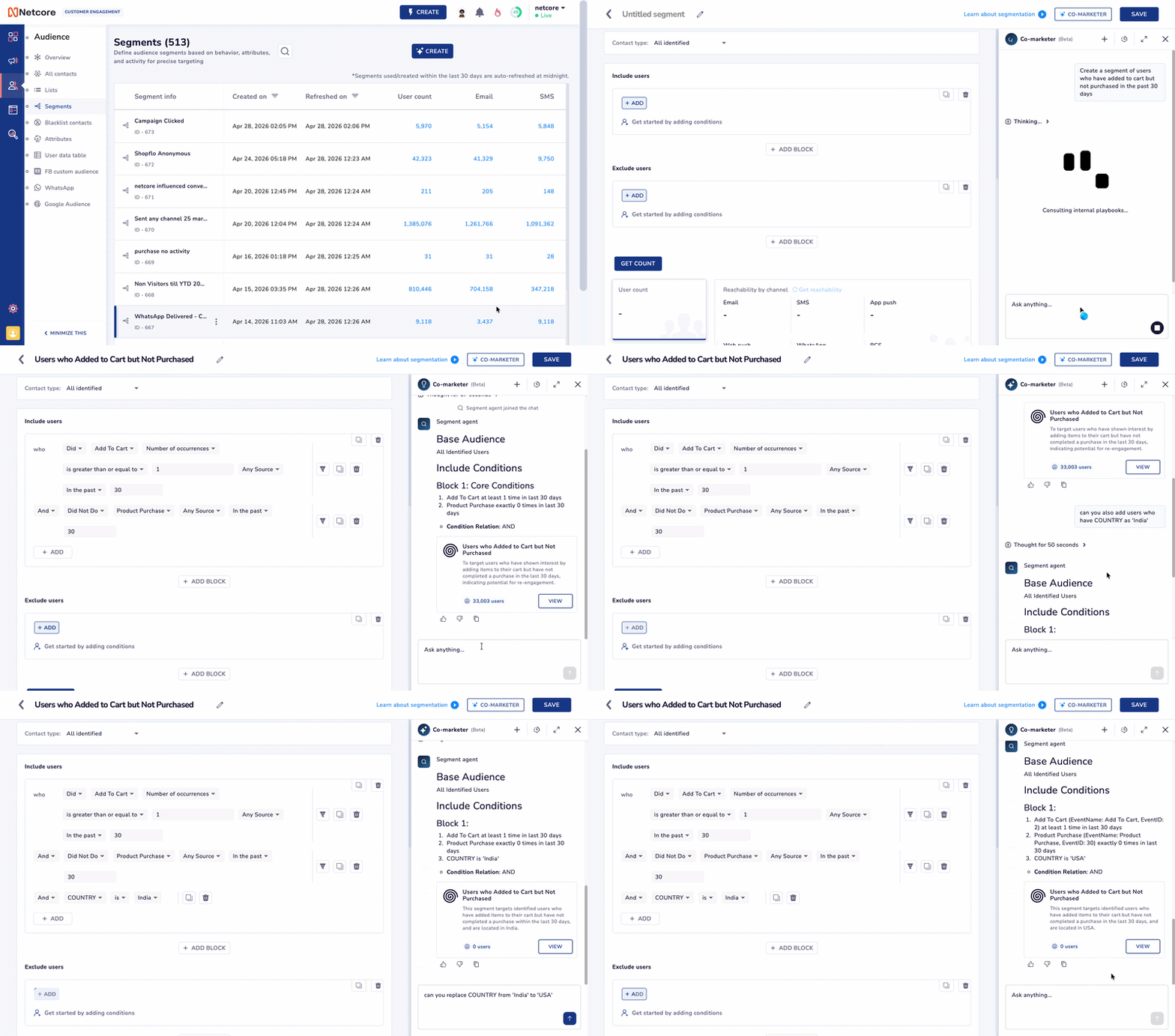
Creating the perfect audience shouldn't feel like a reset button. And now it's not.
Earlier, if you wanted to make any changes, tweak a timeframe, add a condition, or narrow the audience, you had to start fresh. The chat history was gone, and you were back to square one.
That's no longer the case.
You can now describe your audience, review what's been created, and refine it on the spot, all within the same session. No restarts, no lost context, no repeating yourself.
What This Means For You?
Real-Time Tweaking: Need to change "last 30 days" to "last 14 days"? Just ask. The Agent now remembers your previous criteria, so you can layer on changes instantly.
Natural Refinement: Instead of rebuilding a segment to exclude recent buyers, just tell the Agent: "Actually, remove anyone who purchased something yesterday." It gets it right the first time.
Zero Wasted Effort: Your progress is saved as you go. Refine your audience until it’s exactly what you need, then hit save.
Your History is Saved: Go back to any previous conversation and reuse the same segmentation.
In practice
Before: Every change meant starting over > rewriting your query > rebuilding your segment
Now: Simply adjust your request in the same flow > refine > save!
Start using the agent today. Refer here for the documentation.
April 23rd, 2026
Enhancements
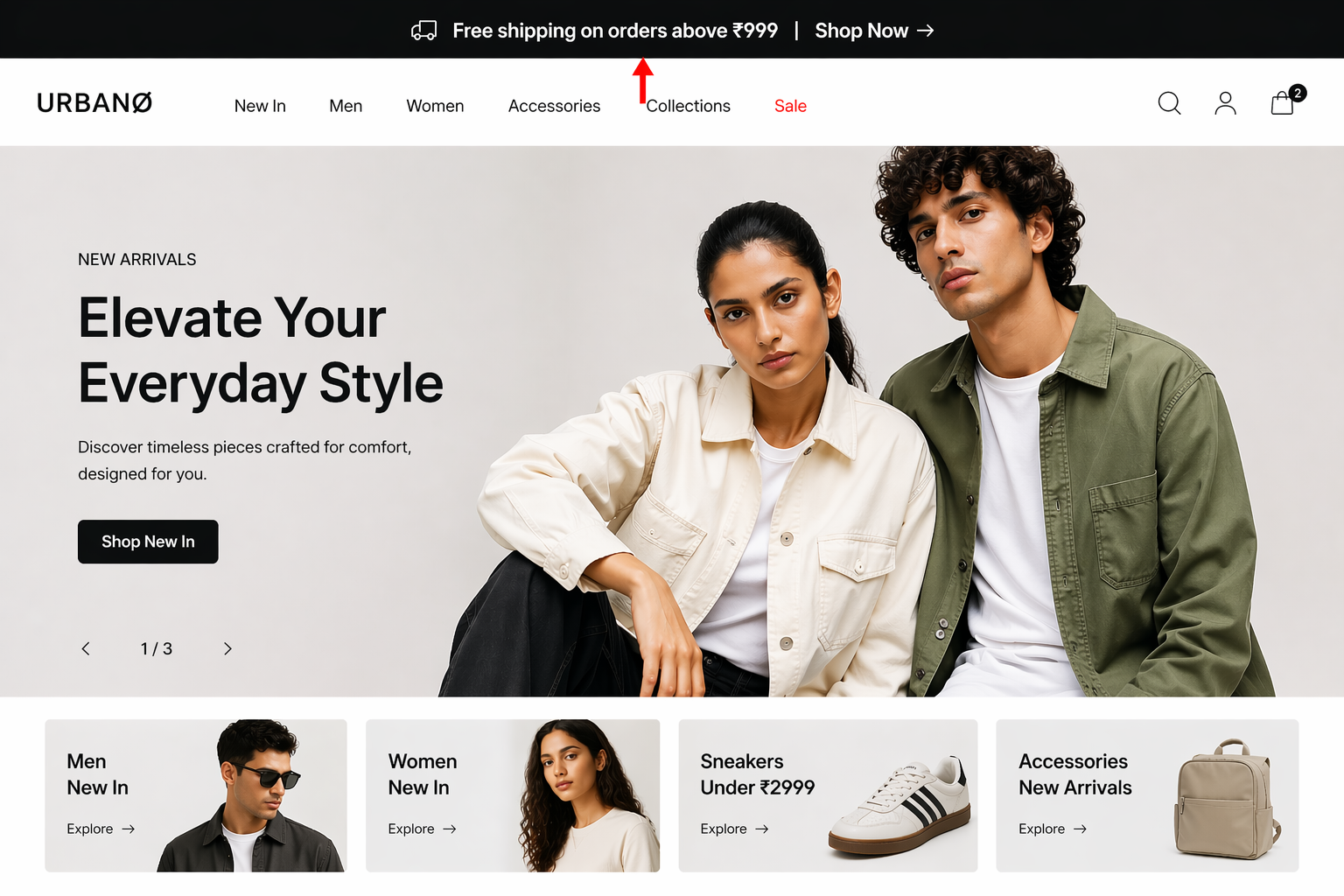
The Hello Bar you've relied on to grab attention just got a serious upgrade. You can now do more with every pixel of that bar.
What's New!
Independent message controls: Each message gets its own CTA, coupon code, timer, image. Tailor every message to drive action, not just awareness.
Message manager: Add, duplicate, or delete messages on the fly. Building a multi-message rotation has never been faster.
Smarter width control: Go full width with one click, or dial in the exact width you want with the new slider.
Whether you're running a flash sale, capturing leads, or counting down to a launch, Hello Bar gives you the flexibility to do it all from a single bar.
Note: Existing campaigns are unaffected and will continue to work as before.
Read the complete documentation here.