
What's New

Follow new updates and improvements to Netcore CE.

UCE 2 for WhatsApp - Alpha Release Now Available
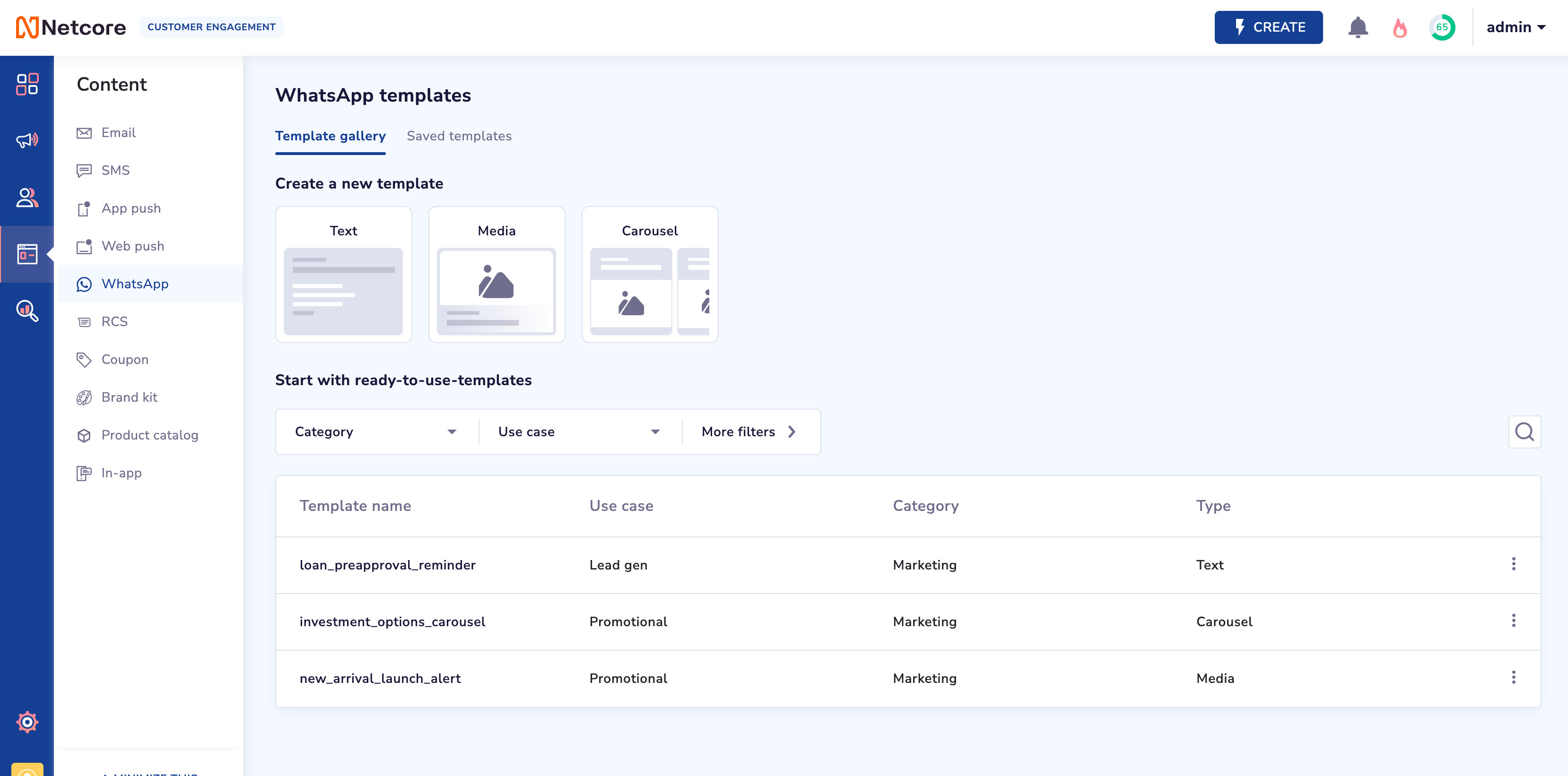
📣 Alpha Release: Unified Content Editor (UCE 2) for WhatsApp

We’re excited to announce the Alpha Release of Unified Content Editor (UCE 2) for WhatsApp, now available on a request-only basis. This release invites a select group of early adopters to explore powerful new capabilities in message creation, personalization, and performance tracking.

✨ What’s New

  • Improved Editing Experience

    Create dynamic, personalized content with enhanced flexibility and control.

  • Personalization

    Customize messages based on user behavior to drive deeper engagement.

  • Ready-to-use Templates

    Deploy campaigns faster using a library of pre-built templates designed for WhatsApp journeys.

  • Enhanced Media Support

    Add rich media to your messages, including images, MP4 videos, and personalized media URLs, Documents etc.

  • Link Tracking

    Gain visibility into campaign performance with full support for click tracking and analytics

📄 Documentation & Migration

🧭 What’s Next

This is an Alpha Release, and access will be granted based on request. We will prioritize participation based on use case relevance, implementation readiness, and expected impact.
Reach out to your account Manager or helpdesk for the same.

WhatsApp Template Link Tracking & Personalization

Release Notes: WhatsApp Template Link Tracking & Personalization
Release Date: March 21, 2025


Overview: This update introduces the Track Any Link functionality to WhatsApp templates, enhancing the flexibility of link management across campaigns and journeys. Whether you need to swap links, personalize them, or track them in your campaigns, this feature ensures everything works smoothly.


Key Updates:

Dropdown Option Renaming:

  • Static Link (No Tracking)

  • Dynamic Link (No Tracking)

  • Track Any Link

Track Any Link Functionality:

  • The new Website URL Input Field lets you add a URL when "Track Any Link" is selected. The URL will be:

    • Integrated directly into CPaaS campaigns by default.

    • Personalized via CSV for advanced campaign targeting.

Integration with Campaign Editor (CE):

  • The Website URL added under "Track Any Link" will seamlessly pass into the CE for use in your campaigns and journeys.

  • You can now edit or swap URLs in your campaigns, giving you full flexibility to ensure links are accurate after launch.

Link Tracking in Campaigns/Journeys:

  • Button Links: The tracking-enabled option will be visible by default for button links.

  • Body Links: Variables in the body section will support HTTP/HTTPS link tracking. Invalid or missing inputs will automatically trigger link tracking for better control.


How This Helps You:

  • Campaign Flexibility: Now, you can easily edit or swap links even after the campaign has been set up. This helps ensure that your links are always accurate and trackable, providing clear insights into which links are being clicked or interacted with.

  • Personalization: Whether you're using attributes, payloads, or CSV files, you can fully personalize and track your links, improving the relevance and effectiveness of your WhatsApp campaigns.


User Experience Enhancements:

  • Clearer Tracking: A new message will appear in the body section of the campaign editor, informing users about link tracking and offering guidance for HTTP/HTTPS formatting.

  • The link tracking icon has been updated for clearer identification, ensuring that your link management process is intuitive.

Important Update to Event Actions: Custom Data Deletion & Retention Period

We have expanded event management capabilities by introducing two new actions: custom event data deletion and customizable data retention periods. These enhancements provide better control over data storage and deletion.

New Event Actions:
1. Set a Custom Data Retention Period for Events

  • Choose how long event data is stored, with 1-month to 5-year options.

  • Default retention period: 12 months.

  • A maximum of 10 events can have a more than 12 months retention period.

  • Data is automatically deleted in the first week of the given month after the retention period ends.

  • System event “Product Purchase“ is retained permanently, and its retention period cannot be modified.

2. Delete Event Data for a Specific Duration

  • Permanently removes event data for a selected timeframe.

  • Review the impact of data deletion in the usage pop up in terms of active campaigns, journeys, etc.

  • The deletion process may take a few hours, based on the volume. Check Event Logs for status updates.

  • In this phase, event data cannot be deleted for specific events with a customized data retention period.

These updates ensure greater flexibility in managing event data while controlling retention and compliance needs.

Earlier updates