
What's New

Follow new updates and improvements to Netcore CE.

Node wise analysis in Journeys powered by Co-marketer
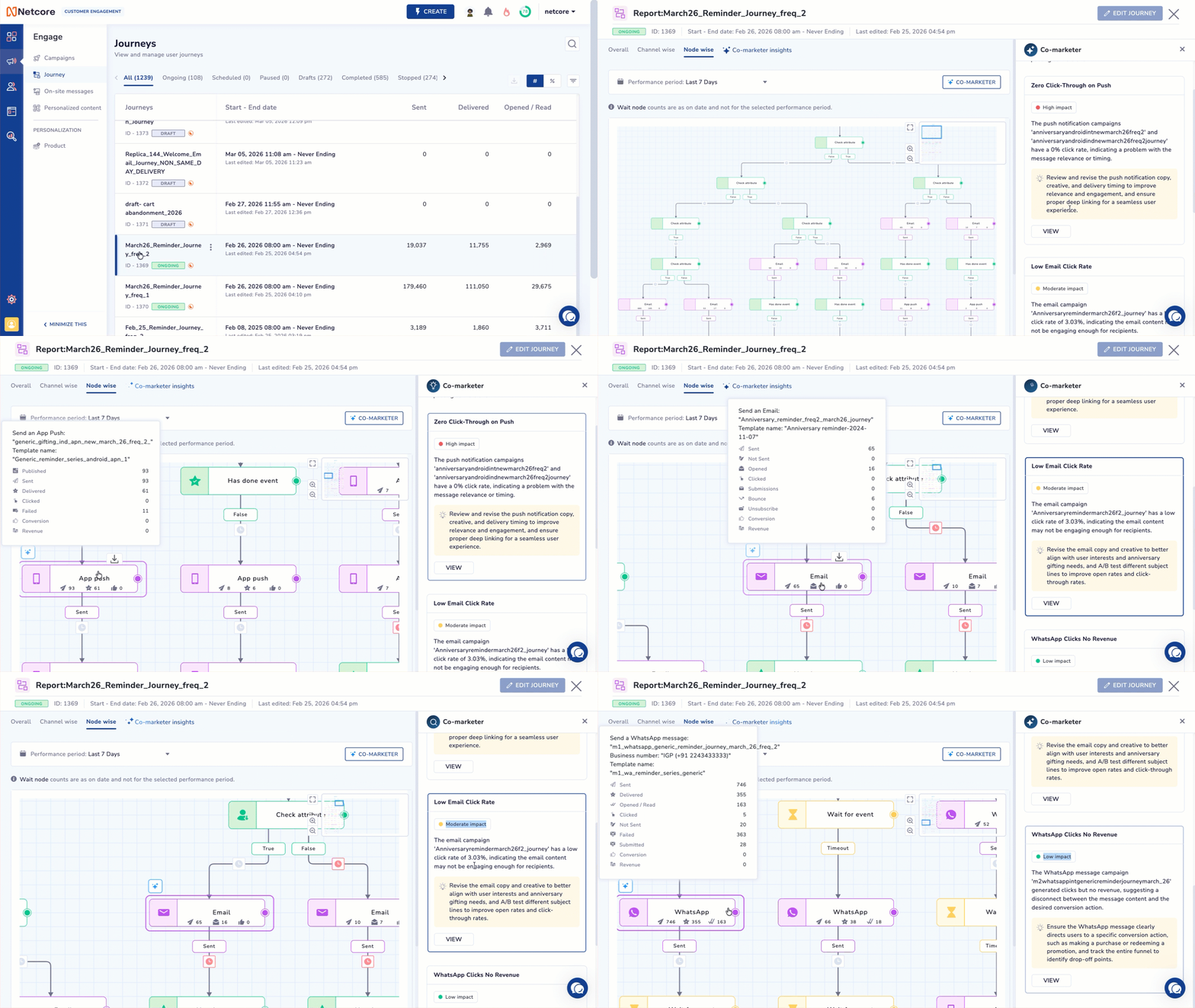
We are excited to announce the extended the Co-marketer functionality to Node wise analysis in Journeys. This update delivers contextual recommendations, industry benchmarking, and a visual troubleshooting experience directly on your journey canvas.

What’s Improved

  • Added Multi-Level Optimization Engine: Delivered actionable recommendations across three levels:

  1. Path-Level: Identified structural inefficiencies (e.g., excessive reminders).

  2. Node-Level: Highlighted underperforming nodes with improvement suggestions.

  3. Global-Level: Flagged overall journey gaps (e.g., missing wait steps).

  • Added Industry & Global Benchmarking: Enhanced insights using vertical-level benchmarks and global best practices for more contextual and reliable recommendations.

  • Added Interactive Canvas Navigation: Enabled click-to-locate functionality that automatically pans, zooms, and highlights the relevant node on the canvas.

  • Added Visual Alert Badging: Mapped recommendations with numbered badges on the canvas, making it easier to identify and act on issues.

How It Works

  • Auto-Launch: Navigate to the Node-wise tab of any active journey. The Co-marketer side window will automatically open, pre-loaded with your tailored optimizations.

  • Navigate Visually: Review the numbered list of insights. Click on any specific recommendation, and the canvas will instantly zoom in and highlight the exact node requiring attention.

Manage Alerts: If you close the drawer (via the ‘X’ button), you can easily reopen it at any time by clicking the floating “Journey Alerts (X)” button on your canvas.


Additional Notes

  • Non-Conversational: To ensure fast and highly targeted audits, this feature does not currently support open-ended chat queries (Conversational capabilities across multiple journeys will arrive in the upcoming Phases).

  • Static Execution: The recommendations provided are advisory. Clicking an insight locates the node, but users must manually make the suggested edits to the journey structure or content.

  • Availability: Enabled by default for all panels with the Insight Agent activated. No additional setup required.

Key Use Cases for Clients

  • Frictionless Debugging: Eliminating the time spent hunting for a broken step. A marketer can click an alert and be taken exactly to the node causing the drop-off.

  • Data-Driven Structural Tweaks: Understanding when to cut down on excessive reminders or when to add crucial Wait nodes to prevent audience fatigue, backed by global data.

  • Smart Channel Swapping: Easily identifying when to swap an underperforming email for a higher-converting channel like WhatsApp or RCS based on industry-proven benchmarks.

Refer to our documentation for more information.
New Features

NLP-Based Segment Agent (Beta)

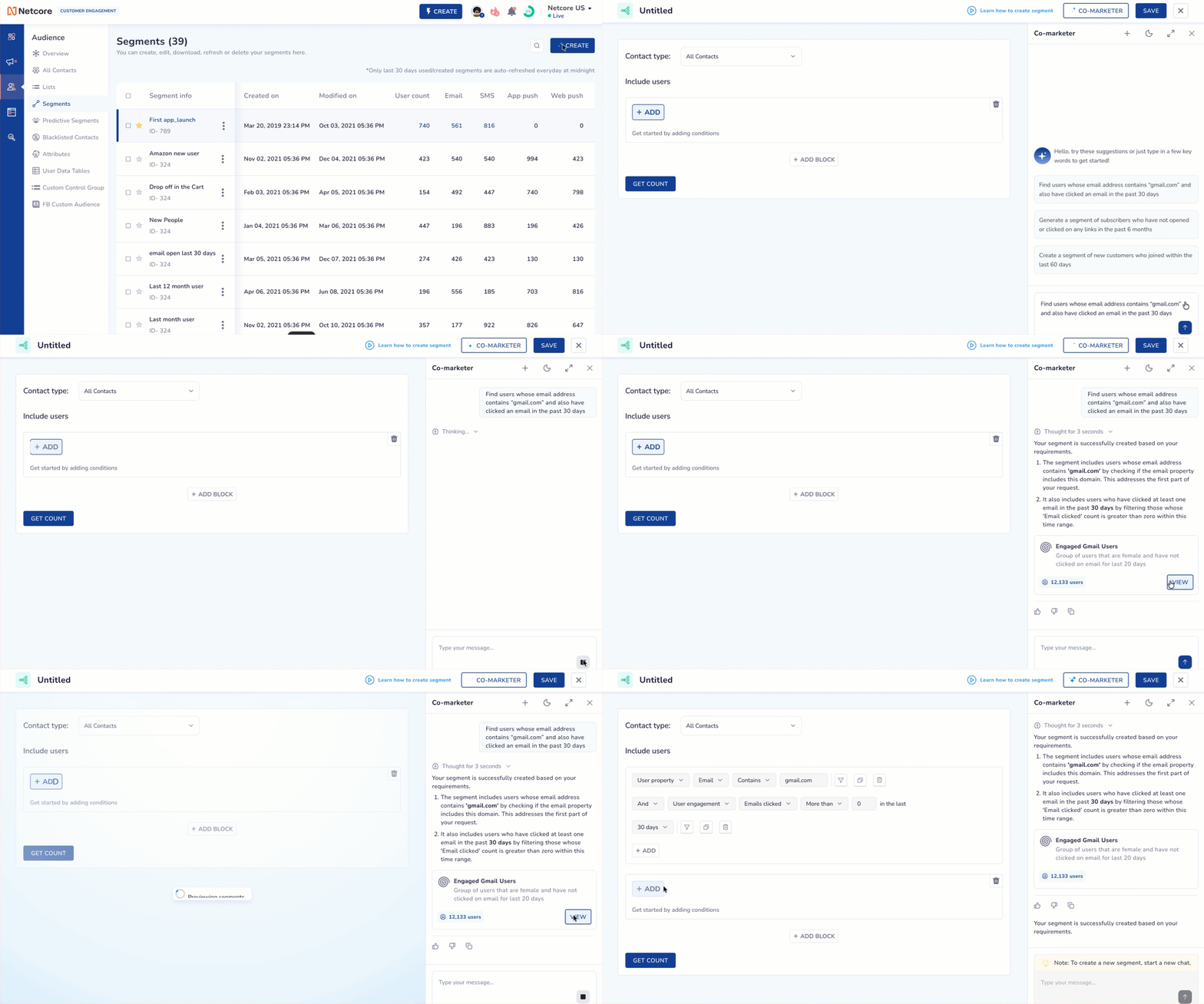
We are excited to announce the first phase of NLP-Based Segmentation, a core component of our new Agentic AI suite. This feature bridges the gap between natural-language ideas and technical segment configurations, significantly reducing the time required to create audiences.

Overview

The Segment Agent allows users to define complex audience rules using simple English prompts. Instead of manually navigating dropdowns and logic gates, you can now describe who you want to target, and the AI will build the rule-set for you.

  • Natural Language Input: Define segments like: “Users who have opened any email in the last 30 days” or “Customers who clicked a push notification at least twice in the past week.”

  • Direct Integration: Once the AI generates the segment logic, it can be directly appended to your existing Segment Builder for further refinement or immediate use in a campaign.

Workflow

  • Prompt: Enter your segment criteria into the input field.

  • Generate: The Segment Agent interprets the intent and maps it to your specific event data (e.g., Email Opens, Click events).

Review: Preview the generated logic and click to add it directly to your Segment Builder.

Support & Fallback Protocol

As this is a beta release, we are continuously training the model on complex query logic.

  • In case of failure: If the agent is unable to accurately translate a prompt, users will be prompted to use the Manual Segment Builder to ensure no interruption to campaign schedules.

  • Feedback Loop: Users are encouraged to “Raise a Query” via support for any failed prompts. Our engineering team logs these instances to refine the NLP accuracy for the upcoming release.

Key Use Cases for Clients

  • Rapid Retargeting: Quickly identifying users who interacted with a specific channel in a recent timeframe.

  • Behavioural Bucketing: Segmenting users based on frequency of actions (e.g., “did X more than 3 times”).

  • Efficiency for New Users: Allowing team members who are less familiar with the technical schema to build accurate audiences without extensive training.

Refer to our documentation for more information.
New Features

Egress Data Transfer

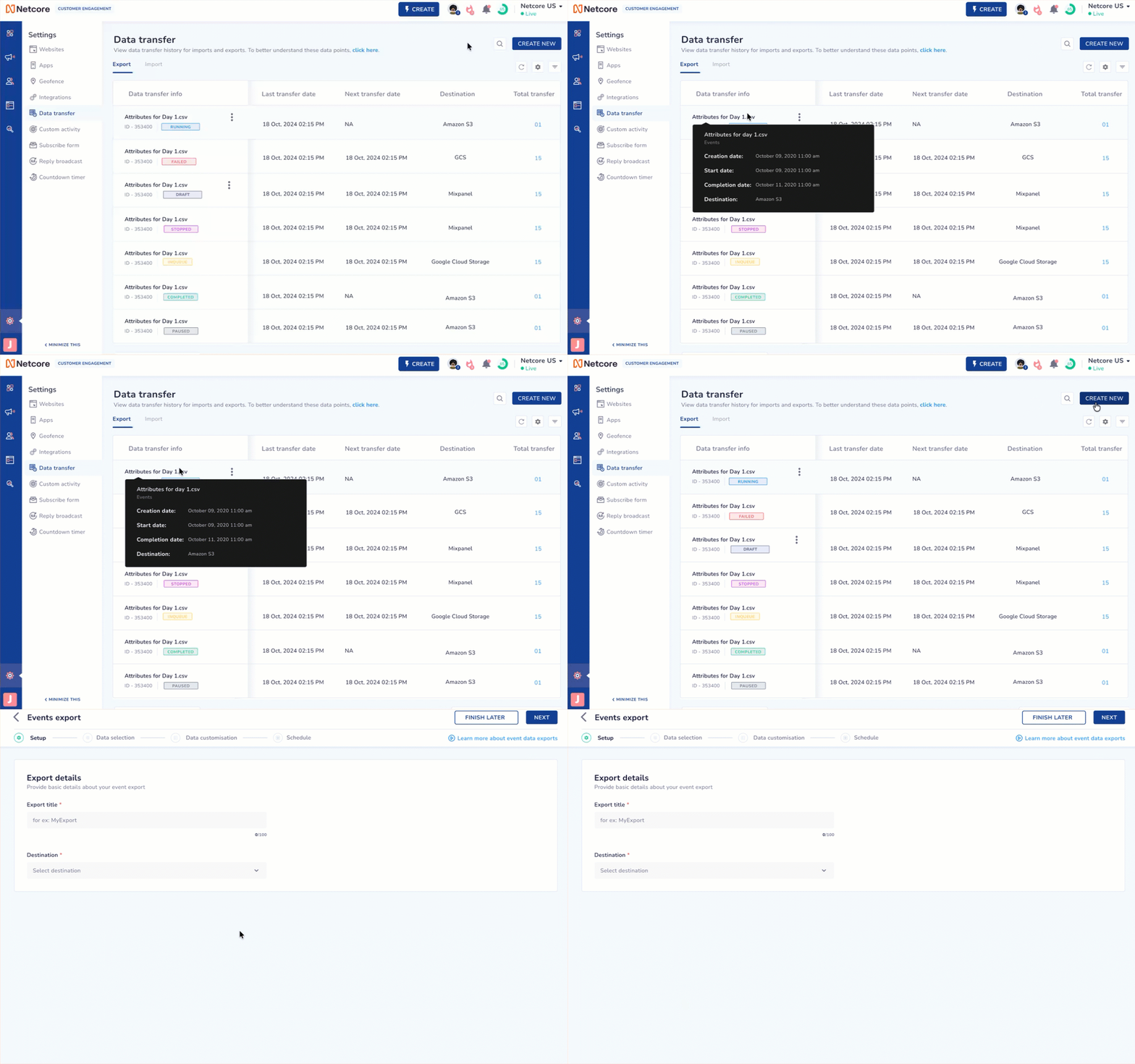
We’ve introduced Egress Data Transfer feature in Netcore CE to support large enterprises with custom data transfer needs. Egress allows you to securely export high-volume datasets from Netcore CE to your internal systems. This feature is best for your data teams for control, flexibility, and automation in how customer engagement data flows into your ecosystem.

Egress currently supports exporting Behavioral and Engagement event types. Amazon S3 is the first supported destination, with more destinations planned.

To get Egress activated for your account, raise a request with the Netcore Support Team. Refer here to learn how to raise a support request.

To know more, refer to our documentation.

Coming soon: The UI is in progress and will be available by the end of this quarter.

New Features

Earlier updates